
Avoid overly-large in memory queues
Rsyslog provides the “queue.size” parameter to set a limit on the number of messages a queue can keep in memory. This is primarily meant to support peak traffic.
Note that this counter is given in number of messages, not bytes. A frequent mistake is to think in bytes and select very large values (e.g. 7 million frequently seen, maybe due to a web tutorial somewhere). If queues are that large there is a chance the rsyslog will be aborted by out of memory condition when the queue gets fuller and fuller.
An example. You send data to a remote syslog server. You define a very large queue on it. Usually, the queue keeps very slow. But when the system goes offline, the queue fills up. This will lead to sharply increasing memory usage. Depending on all circumstances this may not be a problem – or it may be! The likelihood of becoming problematic, and harder to reproduce, increases with the number of queues defined.
To avoid such misunderstandings, rsyslog starting at 8.1905.0 emits a warning message. It has probably lead you to this page. If the queue size is correct, you can ignore the warning message. You can also filter it out via regular rules, if you like. But if you did not intend to define such a large queue, please reconsider the value.
Note: rsyslog considers queues larger than 500,000 messages to be overly large – there seldom is a good reason to use sizes in excess of that.
message modification modules: why run in direct (queue) mode?
Message modificaton modules modify the message object, so the next actions can process the modified message. However, if the action that invokes the message modification module runs on a real queue (anything other than queue.type=”direct”), the message object is actually duplicated, and done so only for executing the action. In other words, the duplicated message object is immediately destroyed after the action completes. That means the modification made by the module will never be visible by anyone else.
So never run a message modification module on a non-direct queue. Message modification modules usually start with the letters “mm” (as in “mmjsonparse”).
Note that this is not a bug: rsyslog’s design is generic, and for most other actions the duplication of message is necessary in many cases. The config parser detects this kind of problems, but does not auto-correct it as the issue points to a potentially larger issue.
Tutorial: Sending impstats Metrics to Elasticsearch Using Rulesets and Queues
Originally posted on the Sematext blog: Monitoring rsyslog’s Performance with impstats and Elasticsearch
If you’re using rsyslog for processing lots of logs (and, as we’ve shown before, rsyslog is good at processing lots of logs), you’re probably interested in monitoring it. To do that, you can use impstats, which comes from input module for process stats. impstats produces information like:
– input stats, like how many events went through each input
– queue stats, like the maximum size of a queue
– action (output or message modification) stats, like how many events were forwarded by each action
– general stats, like CPU time or memory usage
In this post, we’ll show you how to send those stats to Elasticsearch (or Logsene — essentially hosted ELK, our log analytics service, that exposes the Elasticsearch API), where you can explore them with a nice UI, like Kibana. For example get the number of logs going through each input/output per hour:
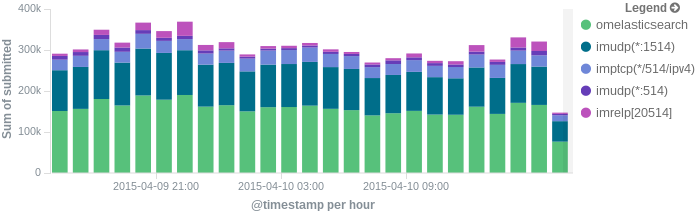
More precisely, we’ll look at:
– useful options around impstats
– how to use those stats and what they’re about
– how to ship stats to Elasticsearch/Logsene by using rsyslog’s Elasticsearch output
– how to do this shipping in a fast and reliable way. This will apply to most rsyslog use-cases, not only impstats
Continue reading “Tutorial: Sending impstats Metrics to Elasticsearch Using Rulesets and Queues”
rsyslog statistic counter Queues
Queue
For each queue inside the system its own set of statistics counters is created. If there are multiple action (or main) queues, this can become a rather lengthy list. The stats record begins with the queue name (e.g. “main Q” for the main queue; ruleset queues have the name of the ruleset they are associated to, action queues the name of the action).
- size – currently active messages in queue
- enqueued – total number of messages enqueued into this queue since startup
- maxsize – maximum number of active messages the queue ever held
- full – number of times the queue was actually full and could not accept additional messages
- discarded.full – number of messages discarded because the queue was full
- discarded.nf – number of messages discarded because the queue was nearly full. Starting at this point, messages of lower-than-configured severity are discarded to save space for higher severity ones.
Lower Bound for Queue Sizes
The queue.size parameter permits to specify the maximum queue size in number of messages. While not technically enforced, there is a lower limit on this parameter. Setting it to very low values (roughly below 100 messages) is not supported and can lead to unpredictable results. Also, future version my automatically adjust to a safe lower bound and/or decide to fail queue startup in those cases. So if you use very low values, do so at your own risk.
Encrypted disk queues
This guide will tell you, how to quickly protect your disk queue through encryption. So you can be sure that unauthorized persons can’t read your queue.
Please note that we only use the “disk” queue format in this guide to show you the encrypted files but normally we recommend you to use the “LinkedList” queue format for a better performance.
This feature is available from version 7.5.0 or higher. In addition to rsyslog we need the most current version of librelp.
The Intention
Whenever two systems talk over a network, something can go wrong. For example, the communications link may go down, or a client or server may abort. Even in regular cases, the server may be offline for a short period of time because of routine maintenance.
A logging system should be capable of avoiding message loss in situations where the server is not reachable. To do so, unsent data needs to be buffered at the client while the server is offline. Then, once the server is up again, this data is to be sent.
This can easily be acomplished by rsyslog. In rsyslog, every action runs on its own queue and each queue can be set to buffer data if the action is not ready. Of course, you must be able to detect that “the action is not ready”, which means the remote server is offline. This can be detected with plain TCP syslog and RELP, but not with UDP. So you need to use either of the two. In this howto, we use plain TCP syslog.
Please note that we are using rsyslog-specific features. The are required on the client, but not on the server. So the client system must run rsyslog (at least version 7.5.0), while on the server another syslogd may be running, as long as it supports plain tcp syslog.
Normally the rsyslog queueing subsystem tries to buffer to memory if you use the “LinkedList” queue typ. So even if the remote server goes offline, no disk file is generated. File on disk are created only if there is need to, for example if rsyslog runs out of (configured) memory queue space or needs to shutdown (and thus persist yet unsent messages). Using main memory and going to the disk when needed is a huge performance benefit. But in this case we only want to create a disk queue which is encrypted. So we use “Disk” as the queue typ, disk means that rsyslog writes immediately.
How To Setup
First, you need to create a working directory for rsyslog. This is where it stores its queue files (should need arise). You may use any location on your local system.
What have to do next is instruct rsyslog to use a disk queue and then configure your action. There is nothing else to do. With the following simple config file, you forward anything you receive to a remote server and have buffering applied automatically. This must be done on the client machine.
module(load=” imuxsock”) # local message reception
$WorkDirectory /home/test/rsyslog/work # default location for work (spool) filesaction(type=”omfwd”
queue.type=”disk” queue.fileName=”enc”
queue.cry.provider=”gcry” queue.cry.key=”/path/to/contrib/gnutls/key.pem”
target=”172.123.123.5
port=”10514″)
The “queue.fileName=”enc”” is used to create encrypted queue files, should need arise. This value must be unique inside rsyslog.conf. No two rules must use the same queue file. Also, for obvious reasons, it must only contain those characters that can be used inside a valid file name. Rsyslog possibly adds some characters in front and/or at the end of that name when it creates files. So that name should not be at the file size name length limit (which should not be a problem these days).
In the next value “queue.cry.key=”/path/to/key”” you have to provide the path to your keyfile, if this path is invalid rsyslog will not encrypt your queue files.
Please note that actual spool files are directly created because we use the “disk” mode, if you use the “LinkedList” mode then they are only created if the remote server is down and there is no more space in the in-memory queue. By default, a short failure of the remote server will never result in the creation of a disk file as a couple of hundered messages can be held in memory by default. [These parameters can be fine-tuned. However, then you need to either fully understand how the queue works (read elaborate doc) or use professional services to have it done based on your specs ;) – what that means is that fine-tuning queue parameters is far from being trivial…]
If you would like to test the encryption scenario, you need to stop, wait a while and restart your server. Then simply open a new generated queue file they should all be encrypted now.
rsyslog 8.2608.0 Released
We are pleased to announce the release of rsyslog 8.2608.0. This release packs a massive wave of improvements, introducing native Kubernetes log tailing, a new AWS CloudWatch Logs output module, modernized storage engine features, and substantial defensive hardening across core protocols and inputs.

Below is a detailed breakdown of what’s new and improved in this cycle.
Key Highlights & Major Features
- Native Kubernetes Log Input (
imkubernetes) A brand-new input module that directly tails container and pod log files from the host filesystem. It seamlessly parses CRI and Dockerjson-fileformats, handles CRI partial-record reassembly, and enriches log events with Kubernetes API metadata. - AWS CloudWatch Logs HLC Output (
omawslogshlc) Introduces native support for streaming logs directly to Amazon CloudWatch via the HTTP Log Collector (HLC) endpoint using bearer-token authentication. Events are efficiently batched per transaction using standard rsyslog action retry paths. - Segmented Disk Queues & Maintenance Utility Disk-assisted queues (
FixedArrayandLinkedList) now leverage the segmented disk engine by default for new stores while safely maintaining existing classic backlogs. Alongside this update, a new segmented queue maintenance utility is now packaged to inspect stores, export lossless JSONL, and perform offline queue repairs. - Performance:
mmnormalizeTurboVM Acceleration When compiled againstliblognorm2.1.0+ with TurboVM enabled,mmnormalizenow supports accelerated worker normalization (turbo="on") and lazy JSON materialization for significantly higher throughput. - Modernized Network ACLs (
allowedSender) Bothimtcpandimudpnow support modern array-basedallowedSenderdirectives at both module and input scopes, giving operators flexible IP-filtering without relying on legacy configuration constructs.
Security, Hardening & Defensive Enhancements
- Dynamic File Path Containment (
omfile): By default,dynaFilepaths derived from message content are now lexically contained within their configured base directory to prevent path traversal issues. - Symlink Controls (
omfile& Disk Queues):omfileadds afollowSymlinkscontrol managed by the secure compatibility policy, while disk queue spools now explicitly reject final-component symlinks. - TLS URI & Security Upgrades (
omfwd,omelasticsearch):omfwd/osslsupportspkcs11:URIs with automatic log sanitization for sensitive PIN attributes.omelasticsearchgains modern TLS controls (tls.tlsversion,tls.ciphersuites,tls.keyexchangegroups), including post-quantum cryptography (PQC) hybrid key exchanges. - Input Resource Guardrails:
imbeats: Added resource and protocol guardrails (memory accounting, compressed payload bounds, receive deadlines) and fixed a issue where failed TLS handshakes could leave listeners disarmed.imhttp/imptcp: Added body size checks after gzip decompression and tightened regex-framing recovery to prevent negative length calculation errors.impcap: Added explicit bounds checks on ARP/RARP packet address lengths.
Kubernetes & Cloud Infrastructure Refinements
mmkubernetesEnhancements:- Added Kubernetes API URL failover across multiple endpoints using array syntax.
- Dynamic ServiceAccount token refreshing at configurable intervals (with 401 retries) to support automatic token rotation without daemon restarts.
- Opt-in/opt-out namespace metadata via
includeNamespaceMetadatato reduce memory and lookup overhead when pod enrichment is sufficient.
- Opt-in
systemdREADY Delay: The newsystemd.notifyReadyDelay="on"setting allows rsyslog to delay signalingREADY=1to systemd until opt-in inputs (likeimfile) finish loading state files and setup work.
Engine, Scripting & Stability Fixes
- RainerScript String Escaping: Modernized string parsing to accept standard
\xhhhexadecimal escapes uniformly across all expression, procedure, and object parameters. - Core Crash Guard:
msgSetPropViaJSON()now safely ignores JSONnullvalues instead of dereferencing null pointers, fixing edge-case crashes triggered viammexternal,mmlua, orpmnormalize. - Sub-Second Delay Fix (
imfile): Corrected byte/time order handling indelay.message, ensuring millisecond values (e.g.,1000) delay for 1ms rather than 1000 seconds. - Journal CPU Loop Prevention (
imjournal): Resolved an issue where journal rotations or invalidations caused a high-CPU busy loop during handle recovery. - Disabled Actions Optimization: Actions marked with
config.enabled="off"no longer instantiate sub-modules or execute setup side effects.
Availability
The rsyslog 8.2606.0 source release is available from the usual rsyslog download locations. Packages and container images may appear with some delay while downstream publishing completes.
Thank you
As always, a huge thank you to all contributors, developers, and users who submitted bug reports, code updates, and feature requests for this release!
rsyslog 8.2606.0: stream compression, Elastic Beats input, and ongoing defensive hardening
We have released rsyslog 8.2606.0, the June 2026 scheduled-stable version. Scheduled-stable releases are bi-monthly snapshots of the daily-stable branch, providing predictable update points with the same functional content as daily-stable at the time of the snapshot.

The main theme of this release is operational robustness under pressure: reducing forwarding bandwidth with experimental stream compression, adding Elastic Beats input support for selected pipeline use cases, and continuing the defensive hardening work across the code base.
The three changes that deserve the most attention are:
- Experimental TCP stream compression for
omfwdtoimtcp - New Elastic Beats / Lumberjack input module via
imbeats - Continued defensive hardening and reliability work
Rsyslog Windows Agent 8.4 Released
A new version of the rsyslog Windows Agent is now available. Version 8.4.0 brings native configuration import/export options, improved service stability, and multiple client bug fixes.
Core Service Engine Updates
In the core engine, a critical concurrency fix has been applied to both the Syslog and RELP forwarding actions. The update resolves shared disk-queue rewrite race conditions that previously occurred when multiple forwarding actions were configured to use the same queue directory simultaneously, ensuring greater data integrity during high-load forwarding scenarios.
Configuration Client Enhancements
Native YAML Support
The Configuration Client now natively supports importing and exporting YAML configuration files. This functionality is fully aligned with the service runtime loader, streamlining configuration backups and migrations across environments.
Reliability & Configuration Handling
Registry-based configuration loading has been hardened to handle fresh installations and incomplete registry data smoothly. Additionally, when encountering unknown configuration blocks—such as those introduced by newer service versions—the client now gracefully skips them with a clear warning rather than failing to load.
Service Management & Stability
Service control logic has been overhauled to handle edge cases such as orphan processes, access control issues, and transitional service states. Administrators now have access to optional process termination options and a direct shortcut to Windows Services.
Timeout messaging during start and stop operations has been clarified for cases where the client stops waiting before Windows completes the service transition. The status bar now explicitly tracks states like Stopping, Starting, and Paused (Reloading), and false stop-timeout errors—where the service had already reached a stopped state—have been eliminated.
Additionally, the Event Viewer now prepends new events following start, stop, restart, or reload actions rather than clearing the existing list, while background threading has been improved to recover cleanly from aborted operations. A client crash on shutdown involving open Event Viewer or Service Management panels has also been resolved.
Released versions
- Service: 8.4.0.239
- Client: 8.4.0.334
rsyslog 8.2604.0: YAML configuration, Azure Monitor output, and stronger hardening
We have released rsyslog 8.2604.0, the April 2026 scheduled-stable version. Scheduled-stable releases are bi-monthly snapshots of the daily-stable branch, providing predictable update points with the same functional content as daily-stable at the time of the snapshot.
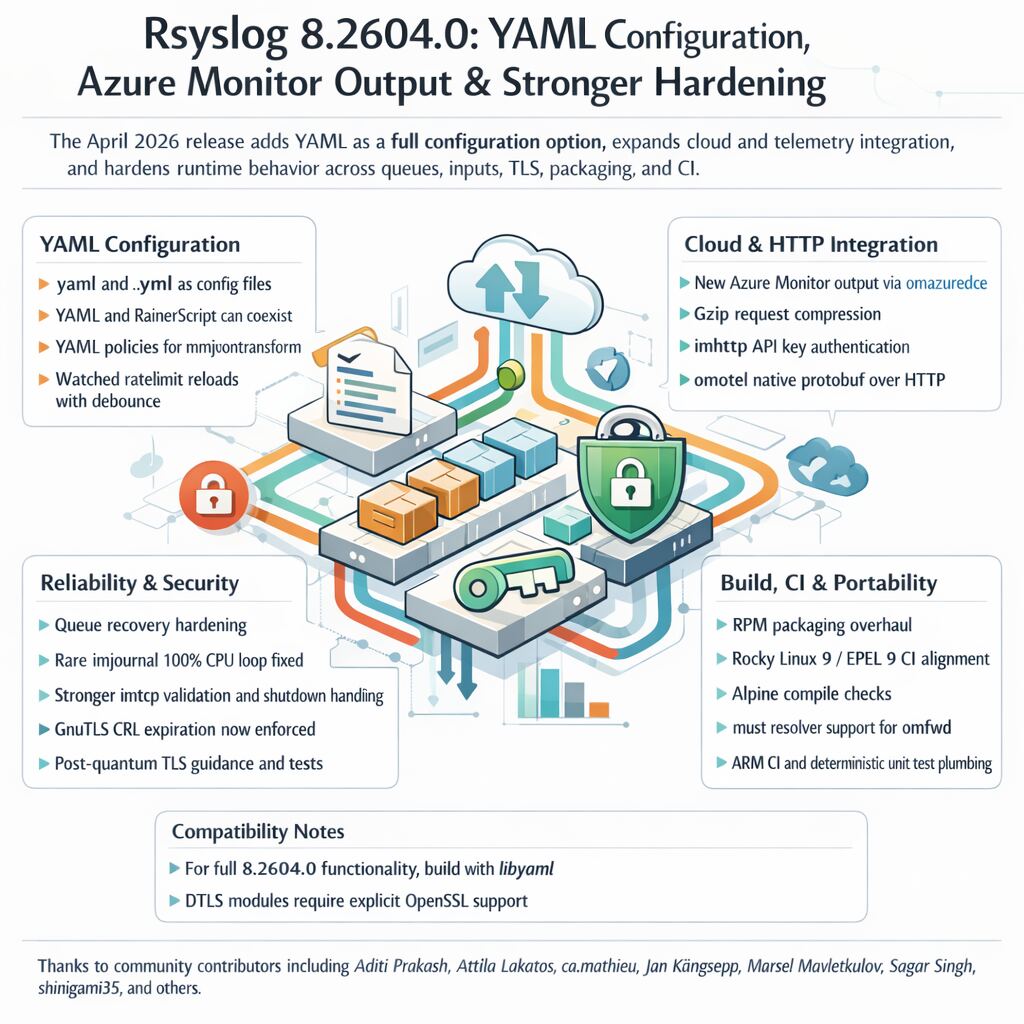
This release makes rsyslog easier to configure, easier to integrate with modern observability platforms, and more robust under failure conditions.
Four major highlights:
- YAML as an alternative configuration format
- Azure Monitor and HTTP ecosystem integration
- Reliability and security hardening
- Packaging, CI, and portability improvements