
rsyslog Windows Agent 26.10 Technical Release Notes
Release date: October 7, 2026
Service build: 26.10.0.354
Configuration Client build: 26.10.0.443
User Interface build: 26.10.0.1018
Upgrade assessment
Recommendation: Recommended update
Why update now: This release updates included OpenSSL libraries to 3.5.9 and corrects configuration editing and service diagnostics in the User Interface.
If you defer: Existing processing continues, but included OpenSSL libraries stay on the previous update, and the configuration-editing and diagnostic corrections in this release remain absent.
Who benefits most: Administrators who use TLS and anyone who edits configuration or follows service diagnostics in the User Interface.
Upgrade and verification: Update rsyslog Windows Agent using the normal supported upgrade path. Confirm that the installed service version is 26.10.0.354. Test the changed functions that are relevant to your deployment.
Important changes
OpenSSL 3.5.9
- Change: The included OpenSSL libraries are updated to 3.5.9.
- Operational impact: TLS-using actions and services run with the updated library.
- Applies to: All rsyslog Windows Agent installations.
- Verification: After upgrade, confirm the installed service build and exercise one TLS-using function you rely on.
Configuration interface and diagnostics
- Change: Workbench edits are validated before saving, and the previous document is restored when a save fails. Leaving the page, reloading, switching the configuration source, or restarting asks whether to save or discard unsaved changes. Move rule up moves the selected rule when two rule names differ only by punctuation. Failures from an older remote registry session are ignored, and service commands that would change a remote target are blocked. Empty optional allowed-peer and TLS rows no longer block other edits. Configuration-tree navigation is denser, selection feedback is clearer, and license file path handling is clearer. The empty Advanced page is removed. Debug-log follow stays with appended lines and a replaced log file.
- Operational impact: Configuration edits are less likely to be lost or applied to the wrong rule, and commands that would change a remote target are blocked.
- Applies to: rsyslog Windows Agent installations using the User Interface for configuration or service diagnostics.
- Verification: Save a valid edit and a failing edit, move two rules whose names differ only by punctuation, and follow a debug log while new lines are appended.
User Interface
- Workbench edits are validated before saving. If a save fails, the previous document is restored.
- Leaving the page, reloading, switching the configuration source, or restarting asks whether to save or discard unsaved changes.
- Move rule up moves the selected rule when two rule names differ only by punctuation.
- Failures from an older remote registry session are ignored, and service commands that would change a remote target are blocked.
- Empty optional allowed-peer and TLS rows no longer block other edits to the selected service.
- Configuration-tree navigation is denser, selection feedback is clearer, and license file path handling is clearer.
- The empty Advanced page is removed.
- Debug-log follow stays in view when lines are appended or the log file is replaced.
Partner deployment notes
Availability: Use the canonical rsyslog Windows Agent download and this Technical Release Notes page as the release reference; do not use temporary build links as the long-term reference.
Localization: The User Interface translation workflow is being prepared. Translation strings and contribution guidance will be published in the Adiscon community repository when available.
Partner verification: Confirm the installed service, Configuration Client, and User Interface builds. Save a configuration change in the User Interface and, where relevant, exercise one TLS-using function.
Related links
rsyslog Windows Agent 26.10: Monthly Patch + Feature Drop
rsyslog Windows Agent 26.10 is the latest monthly Patch + Feature Drop. It updates the included OpenSSL libraries and corrects configuration editing and service diagnostics in the User Interface.
Safer configuration editing
The User Interface validates Workbench edits before saving and restores the previous document if a save fails. Unsaved changes are kept in view when you leave, reload, switch the configuration source, or restart. Rule moves, remote-target protection, configuration-tree navigation, and debug-log follow are corrected, and the empty Advanced page is removed.
Updated OpenSSL
Included OpenSSL libraries are updated to 3.5.9.
The User Interface remains in preview. It is available for production use with appropriate care and review; the Configuration Client remains fully supported.
We recommend keeping rsyslog Windows Agent on the latest Patch + Feature Drop to benefit from current maintenance and product improvements. Your licence remains valid for releases in its calendar year; Upgrade Insurance provides entitlement to later calendar years and their monthly Patch + Feature Drops.
Build information
- Service: 26.10.0.354
- Configuration Client: 26.10.0.443
- User Interface: 26.10.0.1018
Read the Technical Release Notes for rsyslog Windows Agent 26.10 for detailed upgrade guidance, product scope, and verification steps.
liblognorm 2.1.1: Bug-fix release
We are pleased to announce liblognorm 2.1.1, a bug-fix release of the fast log-normalization library used by rsyslog’s mmnormalize module and other applications.
This release corrects parser edge cases and an optimized TurboVM build failure. It is recommended for users of liblognorm 2.1.0.
Continue reading “liblognorm 2.1.1: Bug-fix release”libfastjson 1.2609.0 release
libfastjson 1.2609.0 improves object-member lookup performance, corrects buffered JSON dumping edge cases, and updates build compatibility and quality coverage.
Highlights
- Speed up object member lookup by traversing child pages directly.
- Fix buffered JSON dumping with zero-sized and small caller-provided workspaces.
- Ensure correct linking with
libmon glibc 2.42 and later. - Correct transposed
calloc()arguments that trigger warnings with newer compilers. - Clarify string-buffer lifetime and thread-safety guarantees in the API documentation.
- Expand correctness tests, fuzzing, and cross-platform CI coverage.
Download the Latest Version:
The new version of libfastjson can be downloaded from: libfastjson 1.2609.0 Download
Checksum (sha256sum): 7cd6f78c1c07f4140f6976a9a0e0048bcaa7292329c6ac2c0e070383d83d8edd
rsyslog Windows Agent 26.09 Technical Release Notes
Release date: September 1, 2026
Service build: 26.9.0.353
Configuration Client build: 26.9.0.442
User Interface build: 26.9.0.1017
Upgrade assessment
Recommendation: Recommended update
Why update now: This release corrects service-stop handling during configuration reload, startup of custom-named Windows services, and a timestamp-conversion crash. It also improves administration through the User Interface metrics dashboard.
If you defer: Installations retain the service-operation and timestamp-conversion limitations addressed by this release, as well as the earlier User Interface administration behaviour.
Who benefits most: Administrators who reload configuration, use custom Windows service names, or use the User Interface metrics dashboard.
Upgrade and verification: Update using the normal supported path. Confirm service build 26.9.0.353, reload configuration in a controlled maintenance window, verify a custom service name where used, and reload the User Interface dashboard after Metrics Helper setup.
Important changes
Service operation and reliability
- Change: Stop requests are retained during configuration reload, and services with custom Windows service names start reliably.
- Operational impact: Reduces avoidable disruption during service administration and maintenance.
- Applies to: rsyslog Windows Agent installations that reload configuration or use custom service names.
- Verification: Reload configuration and, where applicable, stop/start the custom-named service during a controlled maintenance window.
Timestamp conversion reliability
- Change: A crash while converting certain read-only timestamp properties is corrected.
- Operational impact: Improves reliability for configurations that process these timestamp properties.
- Applies to: rsyslog Windows Agent configurations using the affected timestamp conversion path.
- Verification: Process a representative test message that uses the relevant timestamp property.
Configuration Client and User Interface
- After local Metrics Helper setup, standard users can reload the User Interface metrics dashboard.
- Service-owned older General settings no longer produce unnecessary unknown-configuration indications.
Published errata and known issues
Installer-update reliability: ERR-2026-002: rsyslog Windows Agent update reports success but program files are not upgraded correctly is resolved in the 26.09 setup release. After a direct upgrade from an earlier product generation, confirm that the installed service reports 26.9.0.353 and that the Configuration Client and the required features are present.
Related links
rsyslog Windows Agent 26.09: Monthly Patch + Feature Drop
rsyslog Windows Agent 26.09 is the latest monthly Patch + Feature Drop. It focuses on dependable service operation and smoother configuration administration.
More dependable service operation
The service now keeps a stop request effective even when it overlaps a configuration reload. Services installed with a custom Windows service name also start more reliably.
Smoother configuration administration
The User Interface preserves unsaved configuration changes when you restart as administrator, so you can review and save your work after elevation. After local metrics setup, standard users can reload their configuration without needing to restart as administrator. This release also includes stability maintenance for timestamp and configuration handling.
The User Interface remains in preview. It is available for production use with appropriate care and review; the Configuration Client remains fully supported.
We recommend keeping rsyslog Windows Agent on the latest Patch + Feature Drop to benefit from current maintenance and product improvements. Your licence remains valid for releases in its calendar year; Upgrade Insurance provides entitlement to later calendar years and their monthly Patch + Feature Drops.
Read the Technical Release Notes for rsyslog Windows Agent 26.09 for detailed upgrade guidance, product scope, and verification steps.
rsyslog 8.2608.0 Released
We are pleased to announce the release of rsyslog 8.2608.0. This release packs a massive wave of improvements, introducing native Kubernetes log tailing, a new AWS CloudWatch Logs output module, modernized storage engine features, and substantial defensive hardening across core protocols and inputs.

Below is a detailed breakdown of what’s new and improved in this cycle.
Key Highlights & Major Features
- Native Kubernetes Log Input (
imkubernetes) A brand-new input module that directly tails container and pod log files from the host filesystem. It seamlessly parses CRI and Dockerjson-fileformats, handles CRI partial-record reassembly, and enriches log events with Kubernetes API metadata. - AWS CloudWatch Logs HLC Output (
omawslogshlc) Introduces native support for streaming logs directly to Amazon CloudWatch via the HTTP Log Collector (HLC) endpoint using bearer-token authentication. Events are efficiently batched per transaction using standard rsyslog action retry paths. - Segmented Disk Queues & Maintenance Utility Disk-assisted queues (
FixedArrayandLinkedList) now leverage the segmented disk engine by default for new stores while safely maintaining existing classic backlogs. Alongside this update, a new segmented queue maintenance utility is now packaged to inspect stores, export lossless JSONL, and perform offline queue repairs. - Performance:
mmnormalizeTurboVM Acceleration When compiled againstliblognorm2.1.0+ with TurboVM enabled,mmnormalizenow supports accelerated worker normalization (turbo="on") and lazy JSON materialization for significantly higher throughput. - Modernized Network ACLs (
allowedSender) Bothimtcpandimudpnow support modern array-basedallowedSenderdirectives at both module and input scopes, giving operators flexible IP-filtering without relying on legacy configuration constructs.
Security, Hardening & Defensive Enhancements
- Dynamic File Path Containment (
omfile): By default,dynaFilepaths derived from message content are now lexically contained within their configured base directory to prevent path traversal issues. - Symlink Controls (
omfile& Disk Queues):omfileadds afollowSymlinkscontrol managed by the secure compatibility policy, while disk queue spools now explicitly reject final-component symlinks. - TLS URI & Security Upgrades (
omfwd,omelasticsearch):omfwd/osslsupportspkcs11:URIs with automatic log sanitization for sensitive PIN attributes.omelasticsearchgains modern TLS controls (tls.tlsversion,tls.ciphersuites,tls.keyexchangegroups), including post-quantum cryptography (PQC) hybrid key exchanges. - Input Resource Guardrails:
imbeats: Added resource and protocol guardrails (memory accounting, compressed payload bounds, receive deadlines) and fixed a issue where failed TLS handshakes could leave listeners disarmed.imhttp/imptcp: Added body size checks after gzip decompression and tightened regex-framing recovery to prevent negative length calculation errors.impcap: Added explicit bounds checks on ARP/RARP packet address lengths.
Kubernetes & Cloud Infrastructure Refinements
mmkubernetesEnhancements:- Added Kubernetes API URL failover across multiple endpoints using array syntax.
- Dynamic ServiceAccount token refreshing at configurable intervals (with 401 retries) to support automatic token rotation without daemon restarts.
- Opt-in/opt-out namespace metadata via
includeNamespaceMetadatato reduce memory and lookup overhead when pod enrichment is sufficient.
- Opt-in
systemdREADY Delay: The newsystemd.notifyReadyDelay="on"setting allows rsyslog to delay signalingREADY=1to systemd until opt-in inputs (likeimfile) finish loading state files and setup work.
Engine, Scripting & Stability Fixes
- RainerScript String Escaping: Modernized string parsing to accept standard
\xhhhexadecimal escapes uniformly across all expression, procedure, and object parameters. - Core Crash Guard:
msgSetPropViaJSON()now safely ignores JSONnullvalues instead of dereferencing null pointers, fixing edge-case crashes triggered viammexternal,mmlua, orpmnormalize. - Sub-Second Delay Fix (
imfile): Corrected byte/time order handling indelay.message, ensuring millisecond values (e.g.,1000) delay for 1ms rather than 1000 seconds. - Journal CPU Loop Prevention (
imjournal): Resolved an issue where journal rotations or invalidations caused a high-CPU busy loop during handle recovery. - Disabled Actions Optimization: Actions marked with
config.enabled="off"no longer instantiate sub-modules or execute setup side effects.
Availability
The rsyslog 8.2606.0 source release is available from the usual rsyslog download locations. Packages and container images may appear with some delay while downstream publishing completes.
Thank you
As always, a huge thank you to all contributors, developers, and users who submitted bug reports, code updates, and feature requests for this release!
rsyslog Windows Agent 26.08: Monthly Patch + Feature Drop
rsyslog Windows Agent 26.08 is available now. This monthly Patch + Feature Drop gives Windows log-forwarding teams a clearer view of selected messages, more flexible file monitoring in supported editions, and maintenance improvements for dependable event collection and forwarding.
Faster insight into selected messages
Operators can now view a selected set of stored log and event messages directly in the User Interface. This makes it easier to check what is being processed without leaving the product workflow.
More flexible collection and forwarding
In supported editions, file monitoring can now match files across nested paths with multiple wildcard components, helping teams cover dynamic directory structures with less configuration overhead. 26.08 also improves Event Log monitoring reliability during shutdown and recovery conditions.
Plan your update
The User Interface remains in preview and can be used in production with appropriate care and validation for the individual environment. The Configuration Client remains fully supported.
We recommend keeping rsyslog Windows Agent on the latest Patch + Feature Drop to benefit from current maintenance and product improvements. Consult the rsyslog Windows Agent documentation, then download rsyslog Windows Agent.
rsyslog Windows Agent 2026 — New major release, new licensing, new release cycle

Overview
rsyslog Windows Agent now ships on the 26.07 line (July 2026). This release line uses calendar-based YY.MM version numbers, a monthly update cadence, a license.alic license file, and a next-generation Configuration Client Preview in the installer.
If you are upgrading from rsyslog Windows Agent 8.x (or earlier), read this article before you deploy. Your existing registration name and numeric license keys do not apply on current builds—you need a new license.alic file from Adiscon.
A new way to read version numbers
Older product lines (through 8.x)
Historically, rsyslog Windows Agent used sequential version numbers that increased independently of the calendar. Different Adiscon products used different leading numbers (WinSyslog 18, EventReporter 19, MonitorWare Agent 15, and so on).
| Component | Legacy (8.x) | New (YY.MM) |
|---|---|---|
| Example | 8.3.0.236 | 26.07 |
| Year part | Sequential major 8 | Calendar year short form 26 (2026) |
| Month part | Feature release (e.g. 3) | Release month 07 = July |
Current YY.MM versions
Adiscon changed to calendar-based version numbers. In 26.07, 26 means 2026 and 07 means July. There are no missing intermediate product releases between the last 8.x builds and 26.07.
Later monthly builds in the same year continue as 26.08, 26.09, and so on. When the calendar year rolls forward, the year part advances (for example to 27.01).
New release cycle: monthly updates
Adiscon is aligning rsyslog Windows Agent with a predictable monthly rhythm:
- YY = calendar year (26 = 2026)
- MM = release month (01 = January, 07 = July, 12 = December)
- Regular monthly builds with fixes and improvements during the year
The current general-availability line for this announcement is 26.07 (July). You can plan upgrades knowing that 26.08, 26.09, and so on will arrive through the year. Detailed change lists belong in release notes, not in this overview.
Licensing: from name + keys to a license file
The largest operational change for upgrades from rsyslog Windows Agent 8.x is licensing. Older builds used a registration name and numeric license keys. Current builds use a license.alic file applied under General → License in the configuration client.
| Topic | Older product lines | Current builds |
|---|---|---|
| What you apply | Registration name + numeric license keys | license.alic file |
| Where in the client | License key fields | General → License |
| Optional path | N/A | szLicenseV2Path (path to the file) |
Important: Keys from rsyslog Windows Agent 8.x do not apply on current builds. Contact Adiscon support or sales to obtain a new license.alic for your edition.
Licensing
License file details and how to apply it
What you use now
| File name | license.alic |
| Default location | %ProgramData%\Adiscon\RSyslogAgent\license.alic |
| Configuration | szLicenseV2Path — optional path to the file (path only, not license text) |
| Client location | General → License |
Editions (Basic, Professional, Enterprise) still exist as commercial labels. Product limits such as Remote Event Log and client connections are enforced from entitlements in the license file. The main window status bar shows license status (for example, the licensed organization). A version mismatch between the license file and the installed service may show a warning banner until you apply a matching license.
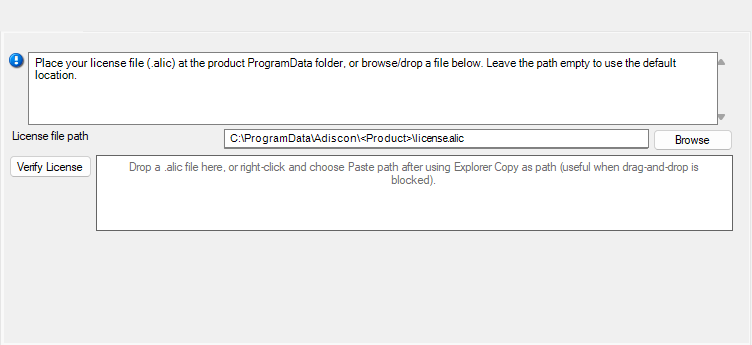
How to apply the license file
- Obtain license.alic from Adiscon for rsyslog Windows Agent (correct edition and entitlements).
- Open the configuration client and select General → License.
- Browse for license.alic, drag-and-drop the file, or paste the file path.
- Use Verify License if you want to check the selected file before or after saving.
- Save the configuration.
- Restart the service so the updated license state is applied.
Configuration snippet (optional)
Administrators using file-based configuration may set an explicit path when they do not use the default location:
szLicenseV2Path C:\ProgramData\Adiscon\RSyslogAgent\license.alic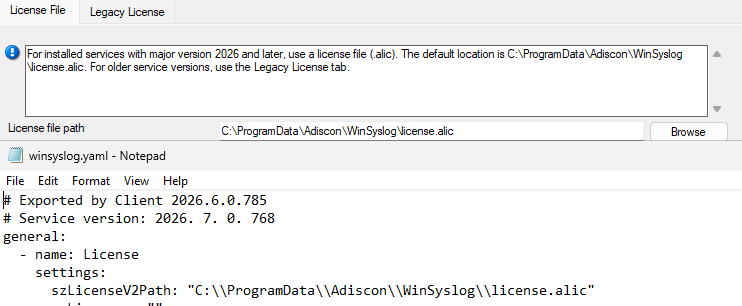
Frequently asked questions (licensing)
Do my 8.x license keys work on current builds?
No for activating current rsyslog Windows Agent builds. Current builds require a license.alic file. Contact Adiscon to obtain one.
Can I use an older product version with my current license?
Yes. Your license can cover older product versions. If the older version does not support license files, contact Adiscon support or sales and request a free license key for that product version.
Can I copy license.alic from another product?
No. Each license is issued for specific product SKUs (RSyslog-WA-Basic, RSyslog-WA-Pro, RSyslog-WA-Enter). The service rejects mismatched products.
What if license.alic is missing?
Without a valid license file, the product follows its normal unlicensed or evaluation behavior for that edition. Apply a valid license.alic under General → License, save, and restart the service.
Do I need internet activation?
No for normal operation. The license file is validated on the machine; you do not need online activation for routine use.
Upgrade
Upgrade path and compatibility
Upgrade planning for rsyslog Windows Agent 8.x to current builds should start with a license.alic request before production rollout. Install or upgrade to 26.07 (July) or a later 26.x monthly build.
Note: The rsyslog Windows Agent is Adiscon’s native Windows agent for rsyslog-compatible deployments—it is not the open-source Linux rsyslog project.
Next-generation Configuration Client Preview
The rsyslog Windows Agent installer for current builds includes two configuration clients:
- Established configuration client — familiar UI, updated for the license file page under General → License.
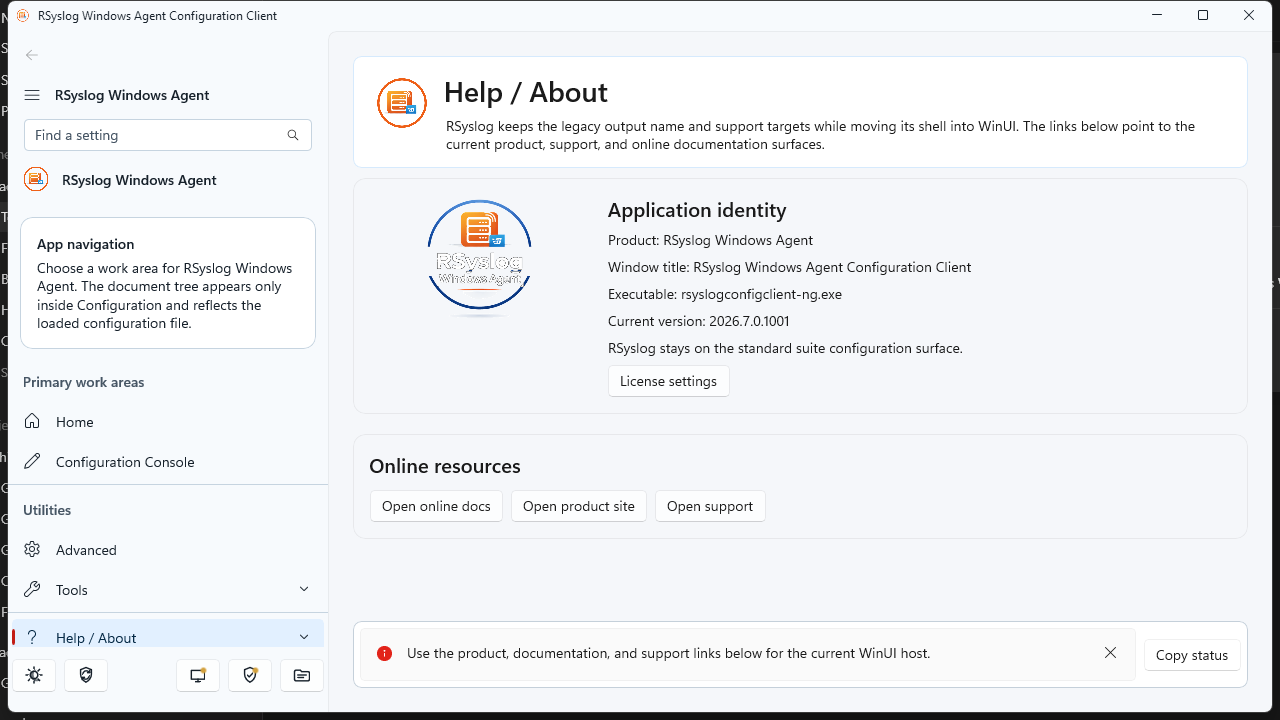
- Next-generation Configuration Client Preview — modern WinUI-based workbench (adiscon-client-ng), shipped as a preview alongside the classic client.
The preview is intended for early adopters. Both clients target the same service and the same license.alic file. Expect the preview label until Adiscon declares general availability.
What changed between 8.x and current builds (overview)
Current builds are a platform refresh, not a single-feature update. Alongside YY.MM versioning and monthly updates, they introduce a license.alic license file, expanded file/YAML configuration options, operational metrics (disabled by default), installer improvements, and ongoing reliability hardening across listeners, actions, and the core engine. For detailed changes in a specific month build, see the product release notes for 26.07 and later.
rsyslog Windows Agent continues to focus on reliable Windows log ingestion and forwarding in rsyslog-compatible deployments; the current line modernizes how you license, version, and configure the product. This is Adiscon’s Windows agent only—not the Linux rsyslog project.
Frequently asked questions (upgrade)
Where is the license file?
Default: %ProgramData%\Adiscon\RSyslogAgent\license.alic
Is the nextgen client required?
No. It is a preview. The classic configuration client remains supported for applying license.alic.
Where should backup tools copy the license?
Back up license.alic together with your configuration directory under the product’s ProgramData folder.
Next steps
- Existing customers: Contact Adiscon support or sales to request your license.alic before or during upgrade.
- New deployments: Install 26.07 or later, apply license.alic under General → License, verify status, then roll out rules and services as usual.
- Monthly updates: Check release notes for 26.07, 26.08, and subsequent monthly builds.
New Liblognorm 2.1.0 release
We are pleased to announce the release of liblognorm 2.1.0, the fast lognormalization library.
liblognorm 2.1.0 introduces TurboVM, a new optional bytecode engine for high-performance log normalization. TurboVM compiles rulebases into optimized bytecode and provides a faster execution path for applications that choose to enable it with ./configure --enable-turbo.
This is a major feature for liblognorm itself, not only for rsyslog. Any liblognorm consumer can add TurboVM support and use the new fast path. rsyslog users are expected to benefit strongly through matching mmnormalize integration work, but the capability is available at the library level.