
Using TLS with RELP
In this guide, we want to describe how to setup rsyslog with a RELP connection which is to be secured with TLS. For this guide you need at least rsyslog 7.5.1 and librelp 1.1.3 as well as gnutls 2.10.0 or above. These need to be installed on the server as well on the clients. The guide will split up into 3 parts.
- Creating the certificates
- Client Configuration
- Server Configuration
Step 1 – Creating the certificates
1.1 Setting up the CA
The first step is to set up a certificate authority (CA). It must be maintained by a trustworthy person (or group) and approves the indentities of all machines. It does so by issuing their certificates. In a small setup, the administrator can provide the CA function. What is important is the the CA’s private key is well-protocted and machine certificates are only issued if it is know they are valid (in a single-admin case that means the admin should not issue certificates to anyone else except himself). The CA creates a so-called self-signed certificate. That is, it approves its own authenticy. This sounds useless, but the key point to understand is that every machine will be provided a copy of the CA’s certificate. Accepting this certificate is a matter of trust. So by configuring the CA certificate, the administrator tells rsyslog which certificates to trust. This is the root of all trust under this model. That is why the CA’s private key is so important – everyone getting hold of it is trusted by our rsyslog instances.
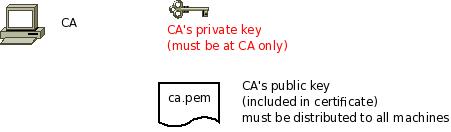
- generate the private key:
certtool --generate-privkey --outfile ca-key.pem
This takes a short while. Be sure to do some work on your workstation, it waits for radom input. Switching between windows is sufficient ;)
- now create the (self-signed) CA certificate itself:
certtool --generate-self-signed --load-privkey ca-key.pem --outfile ca.pem
This generates the CA certificate. This command queries you for a number of things. Use appropriate responses. When it comes to certificate validity, keep in mind that you need to recreate all certificates when this one expires. So it may be a good idea to use a long period, eg. 3650 days (roughly 10 years). You need to specify that the certificates belongs to an authority. The certificate is used to sign other certificates.
Sample Screen Session
Text in red is user input. Please note that for some questions, there is no user input given. This means the default was accepted by simply pressing the enter key.
[root@rgf9dev sample]# certtool --generate-privkey --outfile ca-key.pem --bits 2048
Generating a 2048 bit RSA private key...
[root@rgf9dev sample]# certtool --generate-self-signed --load-privkey ca-key.pem --outfile ca.pem
Generating a self signed certificate...
Please enter the details of the certificate's distinguished name. Just press enter to ignore a field.
Country name (2 chars): US
Organization name: SomeOrg
Organizational unit name: SomeOU
Locality name: Somewhere
State or province order research paper online name: CA
Common name: someName (not necessarily DNS!)
UID:
This field should not be used in new certificates.
E-mail: Enter the certificate's serial number (decimal):
Activation/Expiration time.
The certificate will expire in (days): 3650
Extensions.
Does the certificate belong to an authority? (Y/N): y
Path length constraint (decimal, -1 for no constraint):
Is this a TLS web client certificate? (Y/N):
Is this also a TLS web server certificate? (Y/N):
Enter the e-mail of the subject of the certificate: someone@example.net
Will the certificate be used to sign other certificates? (Y/N): y
Will the certificate be used to sign CRLs? (Y/N):
Will the certificate be used to sign code? (Y/N):
Will the certificate be used to sign OCSP requests? (Y/N):
Will the certificate be used for time stamping? (Y/N):
Enter the URI of the CRL distribution point:
X.509 Certificate Information:
Version: 3
Serial Number (hex): 485a365e
Validity:
Not Before: Thu Jun 19 10:35:12 UTC 2008
Not After: Sun Jun 17 10:35:25 UTC 2018
Subject: C=US,O=SomeOrg,OU=SomeOU,L=Somewhere,ST=CA,CN=someName (not necessarily DNS!)
Subject Public Key Algorithm:
RSA Modulus (bits 2048):
d9:9c:82:46:24:7f:34:8f:60:cf:05:77:71:82:61:66
05:13:28:06:7a:70:41:bf:32:85:12:5c:25:a7:1a:5a
28:11:02:1a:78:c1:da:34:ee:b4:7e:12:9b:81:24:70
ff:e4:89:88:ca:05:30:0a:3f:d7:58:0b:38:24:a9:b7
2e:a2:b6:8a:1d:60:53:2f:ec:e9:38:36:3b:9b:77:93
5d:64:76:31:07:30:a5:31:0c:e2:ec:e3:8d:5d:13:01
11:3d:0b:5e:3c:4a:32:d8:f3:b3:56:22:32:cb:de:7d
64:9a:2b:91:d9:f0:0b:82:c1:29:d4:15:2c:41:0b:97
Exponent:
01:00:01
Extensions:
Basic Constraints (critical):
Certificate Authority (CA): TRUE
Subject Alternative Name (not critical):
RFC822name: someone@example.net
Key Usage (critical):
Certificate signing.
Subject Key Identifier (not critical):
fbfe968d10a73ae5b70d7b434886c8f872997b89
Other Information:
Public Key Id:
fbfe968d10a73ae5b70d7b434886c8f872997b89
Is the above information ok? (Y/N): y
Signing certificate...
[root@rgf9dev sample]# chmod 400 ca-key.pem
[root@rgf9dev sample]# ls -l
total 8
-r-------- 1 root root 887 2008-06-19 12:33 ca-key.pem
-rw-r--r-- 1 root root 1029 2008-06-19 12:36 ca.pem
[root@rgf9dev sample]#
Be sure to safeguard ca-key.pem! Nobody except the CA itself needs to have it. If some third party obtains it, you security is broken!
1.2 Generating the machine certificate
In this step, we generate certificates for each of the machines. Please note that both clients and servers need certificates. The certificate identifies each machine to the remote peer. The DNSName specified inside the certificate can be specified inside the tls.PermittedPeer config statements. For now, we assume that a single person (or group) is responsible for the whole rsyslog system and thus it is OK if that single person is in posession of all machine’s private keys. This simplification permits us to use a somewhat less complicated way of generating the machine certificates. So, we generate both the private and public key on the CA (which is NOT a server!) and then copy them over to the respective machines. If the roles of machine and CA administrators are split, the private key must be generated by the machine administrator. This is done via a certificate request. This request is then sent to the CA admin, which in turn generates the certificate (containing the public key). The CA admin then sends back the certificate to the machine admin, who installs it. That way, the CA admin never get’s hold of the machine’s private key. Instructions for this mode will be given in a later revision of this document. In any case, it is vital that the machine’s private key is protected. Anybody able to obtain that private key can imporsonate as the machine to which it belongs, thus breaching your security.
Sample Screen Session Text in red is user input. Please note that for some questions, there is no user input given. This means the default was accepted by simply pressing the enter key. Please note: you need to substitute the names specified below with values that match your environment. Most importantly, machine.example.net must be replaced by the actual name of the machine that will be using this certificate. For example, if you generate a certificate for a machine named “server.example.com”, you need to use that name. If you generate a certificate for “client.example.com”, you need to use this name. Make sure that each machine certificate has a unique name. If not, you can not apply proper access control.
[root@rgf9dev sample]# certtool --generate-privkey --outfile key.pem --bits 2048
Generating a 2048 bit RSA private key...
[root@rgf9dev sample]# certtool --generate-request --load-privkey key.pem --outfile request.pem
Generating a PKCS #10 certificate request...
Country name (2 chars): US
Organization name: SomeOrg
Organizational unit name: SomeOU
Locality name: Somewhere
State or province name: CA
Common name: machine.example.net
UID: Enter a dnsName of the subject of the certificate:
Enter the IP address of the subject of the certificate:
Enter the e-mail of the subject of the certificate:
Enter a challange password:
Does the certificate belong to an authority? (y/N): n
Will the certificate be used for signing (DHE and RSA-EXPORT ciphersuites)? (y/N):
Will the certificate be used for encryption (RSA ciphersuites)? (y/N):
Is this a TLS web client certificate? (y/N): y
Is this also a TLS web server certificate? (y/N): y
[root@rgf9dev sample]# certtool --generate-certificate --load-request request.pem --outfile cert.pem --load-ca-certificate ca.pem --load-ca-privkey ca-key.pem
Generating a signed certificate...
Enter the certificate's serial number (decimal):


Activation/Expiration time.
The certificate will expire in (days): 1000


Extensions.
Do you want to honour the extensions from the request? (y/N):
Does the certificate belong to an authority? (Y/N): n
Is this a TLS web client certificate? (Y/N): y
Is this also a TLS web server certificate? (Y/N): y
Enter the dnsName of the subject of the certificate: machine.example.net {This is the name of the machine that will use the certificate}
Enter  the IP address of the subject of certificate:
Will the certificate be used for signing (DHE and RSA-EXPORT ciphersuites)? (Y/N):
Will the certificate be used for encryption (RSA ciphersuites)? (Y/N):
X.509 Certificate Information:
Version: 3 Serial Number (hex): 485a3819
Validity:
Not Before: Thu Jun 19 10:42:54 UTC 2008
Not After: Wed Mar 16 10:42:57 UTC 2011
Subject: C=US,O=SomeOrg,OU=SomeOU,L=Somewhere,ST=CA,CN=machine.example.net
Subject Public Key Algorithm: RSA
Modulus (bits 2048):
b2:4e:5b:a9:48:1e:ff:2e:73:a1:33:ee:d8:a2:af:ae
2f:23:76:91:b8:39:94:00:23:f2:6f:25:ad:c9:6a:ab
2d:e6:f3:62:d8:3e:6e:8a:d6:1e:3f:72:e5:d8:b9:e0
d0:79:c2:94:21:65:0b:10:53:66:b0:36:a6:a7:cd:46
1e:2c:6a:9b:79:c6:ee:c6:e2:ed:b0:a9:59:e2:49:da
c7:e3:f0:1c:e0:53:98:87:0d:d5:28:db:a4:82:36:ed
3a:1e:d1:5c:07:13:95:5d:b3:28:05:17:2a:2b:b6:8e
8e:78:d2:cf:ac:87:13:15:fc:17:43:6b:15:c3:7d:b9

Exponent: 01:00:01
Extensions:
Basic Constraints (critical):
Certificate Authority (CA): FALSE
Key Purpose (not critical):
TLS WWW Client. TLS WWW Server.
Subject Alternative Name (not critical):
DNSname: machine.example.net
Subject Key Identifier (not critical):
0ce1c3dbd19d31fa035b07afe2e0ef22d90b28ac
Authority Key Identifier (not critical):
fbfe968d10a73ae5b70d7b434886c8f872997b89
Other Information:
Public Key Id:
0ce1c3dbd19d31fa035b07afe2e0ef22d90b28ac

Is the above information ok? (Y/N): y
Signing certificate...
[root@rgf9dev sample]# rm -f request.pem
[root@rgf9dev sample]# ls -l
total 16
-r-------- 1 root root 887 2008-06-19 12:33 ca-key.pem
-rw-r--r-- 1 root root 1029 2008-06-19 12:36 ca.pem
-rw-r--r-- 1 root root 1074 2008-06-19 12:43 cert.pem
-rw-r--r-- 1 root root 887 2008-06-19 12:40 key.pem
[root@rgf9dev sample]# # it may be a good idea to rename the files to indicate where they belong to
[root@rgf9dev sample]# mv cert.pem machine-cert.pem
[root@rgf9dev sample]# mv key.pem machine-key.pem
[root@rgf9dev sample]#
Distributing Files Provide the machine with:
- a copy of ca.pem
- cert.pem
- key.pem
Never provide anyone with ca-key.pem! Also, make sure nobody but the machine in question gets hold of key.pem.
Step 2: Client Configuration
Usually, this is a rather simple matter. It is basically a configuration to forward messages via RELP, just with a few extra parameters. A configuration could look like this:
module(load="imuxsock")
module(load="omrelp")
module(load="imtcp")
input(type="imtcp" port="514")
action(type="omrelp" target="192.168.233.153" port="20514" tls="on" tls.caCert="/home/test/cert/ca.pem" tls.myCert="/home/test/cert/ubuntu1-cert.pem" tls.myPrivKey="/home/test/cert/ubuntu1-key.pem" tls.authmode="name" tls.permittedpeer=["ubuntu-server"] )
The configuration is basically made of 3 parts.
First we load the modules that we need. In this case it is imuxsock, omrelp and imtcp. While imtcp and imuxsock are input modules and thus basically server for “generating” log data, omrelp is a output module and server to forward messages to a server via RELP.
The second part is a input. While imuxsock is always listening when the module is loaded, imtcp needs to be configured as an extra item. This also holds the possibility to configure multiple TCP listeners which could listen to different ports or have different parameters.
The third part is the action. In our case, we simply take all messages and forward them via RELP to our central server. Basically for a RELP connection it would be sufficient to configure the target and the port to send on. For this case, we enable TLS transportation with tls=”on” and secure it with our certificates. As you can see, we need to load our three certificate files as mentioned in the first section. They are all three needed. Also, we define the authentication mode as “name”. By that, the certificate of the other machine will be checked against the hostname to ensure the right machine uses the certificate. Also we allow a certain peer with tls.permittedpeer to answer to this machine.
Step 3: Server Configuration
The server configuration is only a little more complicated than the client configuration. Here is the example.
module(load="imuxsock")
module(load="imrelp" ruleset="relp")
input(type="imrelp" port="20514"
tls="on"
tls.caCert="/home/test/cert/ca.pem"
tls.myCert="/home/test/cert/server-cert.pem"
tls.myPrivKey="/home/test/cert/server-key.pem"
tls.authMode="name"
tls.permittedpeer=["ubuntu-client1","ubuntu-client2","ubuntu-client3"] )
ruleset (name="relp") { action(type="omfile" file="/var/log/relp_log") }
Again, the configuration is made of 3 sections.
First we load the modules. In this case, we load imuxsock for local logging ability (though not further used here) and imrelp for receiving log messages via RELP. As you can see, the module has the ruleset parameter given. That means, that the whole module is bound to a ruleset. This means, that all configured listeners will automatically use the later configured ruleset. This is contrary to other modules where you can configure a separate ruleset for each listener, but this is not possible with imrelp.
The second portion is the input. For a basic configuration it would be sufficient to specify the port to listen on. But since we want to enable TLS-functionality, we need to use tls=”on” again. Also we need to configure the parameters for all the parts of the certificate. Please note, that except for the CA certificate (which is the same on all machines) the certificate and key need to be for this single machine. Also we configure the authentication mode to “name” and an array of permitted peers.
Finally, as third step, we configure the ruleset and the action. In this case, we simply use the omfile module. The functionality is automatically loaded through rsyslog and we do not need to configure the module explicitely at the beginning.
Verdict
One would agree, that setting up rsyslog to use TLS-secured RELP for transferring log messages is basically very easy. Though, creating and maintaing all the certificates can be a tedious amount of work. But, a secure log transmission sure is worth the effort. Also, despite what has been mentioned, a machine certificate could also be created for multiple machines at once, though this is not recommended by Adiscon.
Something that is also noteworthy concerns the authentication mode. There are two other options that can be used, but these are not as secure as authentication against the name. Anonymous authentication can be reached by simply using tls=”on”, but not setting any other parameters. This only secures transportation of log messages, but does not ensure, that no false log data can be injected by a compromised machine or a machine not belonging to your network. A different approach would be fingerprint authentication. This can be used by using the fingerprint of a machine certificate on the peer machine. The fingerprint can be either received by the error log of a machine and then copying and pasting it into tls.permittedpeer, or by using certtool to review certificate details. Please note, that this is not very secure as well as the peers only check for the fingerprint of the certificate and not the certificate itself.
7.4.0 – the new stable
new rsyslog 7.4.0 stable released
We just released rsyslog 7.4.0, a new stable release which replaces the 7.2 branch. After nine month of hard work, there are many exciting enhancements compared to 7.2, and I thought I give you a quick rundown of the more important new features. Note that while I list some “minor features” at the end of this posting, the list is not complete. I left out those things that are primarily of interest for smaller groups of users. So if you look for a specific feature not mentioned here, it may pay to look at the ChangeLog or post a question to the rsyslog mailing list.
With this release, the rsyslog project officially supports the 7.4 and 7.2 branches. If support for older versions is required, utilizing Adiscon’s professional services for rsyslog is recommended.
Note that I only list main headlines for each of the features. Follow links (where provided) to gain more in-depth information.
Security Package
- introduction of Linux-like rate-limiting for all inputs
- “Last message repeated n times” now done on a per-input basis; makes it much more useful AND increases processing speed.
- omjournal writes messages to the journal
- imjournal obtains messages including journal-specific meta data items from the journal
Performance Improvements
- Disk Queue Performance greatly improved
- DNS chache greatly improved and optimized
- omfile now supports fully async writing
- script optimizer now changes frequently-used long-running filters into equivalent quick ones when possible (this even affects some distros default configs and is a great performance saver)
Minor Features
- various plugins now support the new RainerScript based config language
- omlibdbi improvements, among them support for transactions
- ommysql now supports transactions
- improved omfile zip writing speed
- performance optimizations
- omelasticsearch improvements (bulk processing mode, local error file)
- omudpspoof now supports packets larger than 1472 by using fragmentation
- omrelp now supports session timeout
- contributed module (not project-supported) omrabbitmq was added
Newbie guide to rsyslog
Written by Jan Gerhards
Here are some different guides for people, who never worked with rsyslog. First I’ll explain, how to install rsyslog. Besides, I will explain how to install some packages, which you will need to install rsyslog. There are two important ones and some minor ones. After that, I will show how to do some easy configurations. Questions like how can I configure a module? Or How can I configure the input? Will be answered. In the example I will configure rsyslog to receive messages, filter them for one specific IP and store only the messages in a file. In the end I’ll explain something about easy rulesets. In my example I will try the same like I did with the configuration, but I will work with rulesets.
Before you begin
Please note, there are many ways to distribute rsyslog. But, make sure that the platform you build rsyslog on is the same platform as where it should be used. You cannot build rsyslog on CentOS and use it on Ubuntu. The differences between the platforms are just to big. The same applies to different versions of the same platform. When building on a older platform and using it on a newer version, this may work, but with restrictions. Whereas building on a newer version and using it on a older version will probably not work at all. So, if you build rsyslog from Source and want to use it on another machine, make sure the platform is the same.
Preliminary actions
There are generally two very often needed packages, that you have to install before rsyslog: libestr and libee. These can be downloaded here:
Libestr: http://libestr.adiscon.com/download/
Libee: http://www.libee.org/download/
Both are being installed the same, so here is only one step-by-step instruction.
- Download the file
Just download libestr or libee and “cd” into the folder, where you want them. - “tar xzf” the file
after you “cd” to the folder, where the file is, type “tar xzf -name of file”. Your command line should look like this:tar xzf -name of file-
- “Cd” into the new folder
“cd” into the made directory. It will have the same name like the downloaded file. Your command line should look like this:cd -name of file-
- Run “./configure configure –libdir=/usr/lib –includedir=/usr/include”
After you “cd” into that file, just run ” ./configure –libdir=/usr/lib –includedir=/usr/include”. Your command line should look like this:./configure --libdir=/usr/lib --includedir=/usr/include
- Type “sudo make”
Just type this and let the Computer work. Your command line should look like this:sudo make
- Type “sudo make install”
This is the last step. Like with “sudo make”, just let the computer work. Your command line should look like thissudo make install
- The package should work now
Congratulation! You have installed the package! If it doesn’t work properly, you should check if you followed every step right and if you have, contact the support.
There might also be some other packages like libjson0-dev, uuid-dev, bison, flex, libz-dev or python-docutils. These you’ll have to install before installing rsyslog, too. This guide was made on Ubuntu, so if you use any other system, they might be named differently. You can install them with the command
sudo apt-get install -package name-
After you got all the packages, you can install rsyslog. Here is a How to for installing rsyslog.
How to install rsyslog
In this guide is explained how to install rsyslog with the download from the homepage.
- Download rsyslog
You can download rsyslog from the rsyslog webpage at http://www.rsyslog.com/download/ - “tar xzf” the file
Open a terminal. Then you “cd” to where you want the file and then type “tar xzf -name of downloaded file”. Your command line should look like this:tar xzf -name of downloaded file-
- “cd” into the new folder
Then “cd” into the made directory. The new directory will have the same name like the downloaded file. Your command line should look like this:cd -name of file-
- Type “./configure –prefix=/usr”
You just need to run “./configure –prefix=/usr”. There might be an Error that you need to install some packages to precede with installing. For two specific packages I’ve explained how to install them, because you will need them often. Your command line should look like this:./configure --prefix=/usr
- Run “sudo make”
it’s easy, just run “sudo make” and let the computer work. Your command line should look like this:sudo make
- Run “sudo make install”
Just like “sudo make”. Type it, press enter and let the Computer work. Again, there might be some missing packages. Just install them. Your command line should look like this:sudo make install
- Rsyslog should now be installed
Congratulation! You have installed rsyslog! You can check the version of rsyslog by typing: “rsyslogd -v”.
If it doesn’t work properly, you should check if you followed every step right and if you have, contact the support.
Now after you installed rsyslog, you have to configure it. How to do this is explained here.
Configure rsyslog
In this part I’ll explain some basic configuration steps for rsyslog. We configure rsyslog to recive UDP messages, to filter them depending on the IP of the host and to store them in a file.
- How to configure the module
The module has to be configured first. The general line for this configuration is: “module (load=”im-type of protocol-”). So in our example, where we want UDP, it will look like this:Module (load=”imudp”)
- How to configure the input for rsyslog
For the input, you have to give two different information to rsyslog. The first information needed is the protocol type of the input; in my example again UDP. Like in the first line there is an “im-” in front of the protocol-type. The other information is to configure a port for rsyslog, in my example 514. These two information are together in only one line. The line is: “Input (type=”-protocol of input-“port=”-number of port-“). This means for my example, the line has to beInput (type=”imudp” port=”514”)
- How to configure a filter for fromhost-IPs and store them in a file
A filter always has, like a normal conditional sentence, an “if…then” part. If you want to configure it to do something with all notes from a specific IP, between “if” and “then” will be the property “$fromhost-ip ==”-IP, you want to filter-”. After this stays a “then” and after the “then” follows an action in brackets, which I will explain later. In my example I want only the notes from the host with the IP 172.19.1.135. So the line will beIf $fromhost-ip == “172.19.1.135” then {After this we have to tell the computer, what to do if that case is given. In this example we want him to store these messages in the file “/var/log/network1.log”. This is an action with the type “omfile”. To configure the file where to store the messages, the action is “action (type=”omfile” File=”-filename-“). So in this example, it will look like this:
Action (type=”omfile” file=”/var/log/network1.log”)
}
All the lines together now are
Module (load=“imudp“)

Input (type=”imudp” port=”514”)
If $fromhost-ip == “172.19.1.135“ then {
Action (type=”omfile” File=”/var/log/network1.log”)
}
All in all it means: The input for rsyslog will listen to syslog via UDP on port 514. If the IP from the Computer, which sends the messages, is 172.19.1.135, then the action in the brackets will get activated for these. In the action the messages will be stored in the file /var/log/network1.log.
Rsyslog and rulesets
Rulesets are a bit more complicated. A ruleset is a set of rules, as the name implies. These are bound to an input. This works by adding an option to the input, namely “ruleset=”-rulesetname-“”. For example, if I want to bind a ruleset “rs1” to a input the line will look like this:
Input (type=”imudp” port=”514” ruleset=”rs1”)But you still have to define, what the ruleset should do. In this guide I will limit myself to explain, how to create a ruleset, which has one action: to store all the messages in a file. In my example I want to store the messages in the file /var/log/network1.log”.
You define a ruleset like the normal configuration. To define it, you first name it with ruleset (name=”-rulesetname-“). After this you write what it does, in my example the action action (type=”omfile” file=”/var/log/network1.log”). This action you write in these curly brackets: {}.
So my full example looks like this
Module (load=”imudp”)

Input (type=”imudp” port=”514” ruleset=”rs1”)

Ruleset (name=”rs1”) {
Action (type=”omfile” file=”/var/log/network1.log”)
}
In that second example for configurations you can see, how to store all messages from the input into a file by using a ruleset. A rulesset can consist of multiple rules, but without binding it to the input it is useless. It can be bound to an input multiple times or even other rulesets can be called.
Final Conclusion
In this guide I explained how to install rsyslog, how to configure it and how to use rulesets. After you read this guide you are able to do exactly this: you can install rsyslog, configure it and have basic knowlege about rulesets. If you want to learn more about rsyslog, how to configure it or about rulesets, you can find information in the other guides or in the documentation.
Changelog for 7.3.12 (v7-devel)
Version 7.3.12 [devel] 2013-04-25
- added doc for omelasticsearch
Thanks to Radu Gheorghe for the doc contribution. - omelasticsearch: _id field support for bulk operations
closes: http://bugzilla.adiscon.com/show_bug.cgi?id=392
Thanks to Jérôme Renard for the idea and patches. - max number of templates for plugin use has been increased to five
- platform compatibility enhancement: solve compile issue with libgcrypt
do not use GCRY_CIPHER_MODE_AESWRAP where not available - fix compile on Solaris
Thanks to Martin Carpenter for the patch. - bugfix: off-by-one error in handling local FQDN name (regression)
A remporary buffer was allocated one byte too small. Did only affect startup, not actual operations. Came up during routine tests, and can have no effect once the engine runs. Bug was introduced in 7.3.11. - bugfix: build problems on Solaris
closes: http://bugzilla.adiscon.com/show_bug.cgi?id=436 - bugfix: block size limit was not properly honored
- bugfix: potential segfault in guardtime signature provider
it could segfault if an error was reported by the GuardTime API, because an invalid free could happen then
Changelog for 7.3.9 (v7-devel)
Version 7.3.9 [devel] 2013-03-27
- support for signing logs added
- imudp: now supports user-selectable inputname
- omlibdbi: now supports transaction interface
if recent enough lbdbi is present - imuxsock: add ability to NOT create/delete sockets during startup and
shutdown
closes: http://bugzilla.adiscon.com/show_bug.cgi?id=259 - imfile: errors persisting state file are now reported
closes: http://bugzilla.adiscon.com/show_bug.cgi?id=292 - imfile: now detects file change when rsyslog was inactive
Previosly, this case could not be detected, so if a file was overwritten
or rotated away while rsyslog was stopped, some data was missing. This
is now detected and the new file being forwarded right from the
beginning.
closes: http://bugzilla.adiscon.com/show_bug.cgi?id=228 - updated systemd files to match current systemd source
- bugfix: imudp scheduling parameters did affect main thread, not imudp
closes: http://bugzilla.adiscon.com/show_bug.cgi?id=409 - bugfix: build problem on platforms without GLOB_NOMAGIC
- bugfix: build problems on non-Linux platforms
- bugfix: stdout/stderr were not closed on forking
but were closed when running in the forground – this was just reversed
of what it should be. This is a regression of a recent change.
Changelog for 7.3.7 (v7-devel)
Version 7.3.7 [devel] 2013-03-12
- add support for anonymizing IPv4 addresses
- add support for writing to the Linux Journal (omjournal)
- imuxsock: add capability to ignore messages from ourselves
This helps prevent message routing loops, and is vital to have if omjournal is used together with traditional syslog. - field() function now supports a string as field delimiter
- added ability to configure debug system via rsyslog.conf
- bugfix: imuxsock segfault when system log socket was used
- bugfix: mmjsonparse segfault if new-style config was used
- bugfix: script == comparison did not work properly on JSON objects
- bugfix: field() function did never return “***FIELD NOT FOUND***”
instead it returned “***ERROR in field() FUNCTION***” in that case
Changelog for 7.2.6 (v7-stable)
Version 7.2.6 [v7-stable] 2013-03-05
- slightly improved config parser error messages when invalid escapes happen
- bugfix: include files got included in the wrong order
closes: http://bugzilla.adiscon.com/show_bug.cgi?id=411
This happens if an $IncludeConfig directive was done on multiple files (e.g. the distro default of $IncludeConfig /etc/rsyslog.d/*.conf). In that case, the order of include file processing is reversed, which could lead to all sorts of problems.
Thanks to Nathan Stratton Treadway for his great analysis of the problem, which made bug fixing really easy. - bugfix: omelasticsearch failed when authentication data was provided … at least in most cases it emitted an error message:
“snprintf failed when trying to build auth string”
Thanks to Joerg Heinemann for alerting us.
closes: http://bugzilla.adiscon.com/show_bug.cgi?id=404 - bugfix: some property-based filter were incorrectly parsed
This usually lead to a syntax error on startup and rsyslogd not actually starting up. The problem was the regex, which did not care for double quote characters to follow in the action part – unfortunately something that can frequently happen with v6+ format. An example:
:programname, isequal, “as” {action(type=”omfile” …) }
Here, the part
:programname, isequal, “as” {action(type=”omfile”
was treated as the property filter, and the rest as action part. Obviously, this did not work out. Unfortunately, such situations usually resulted in very hard to understand error messages.
How can I check the config?
We have often seen the case, that someone has rsyslog running and makes changes to the configuration. And usually, after making the changes, rsyslog gets restarted, but the changed config is invalid. rsyslog has a function to check the configuration for validity. This can be done very easily by invoking this command:
rsyslogd -N1
(Note that rsyslogd may not be in your search path – then it usually is found in /sbin/rsyslogd)
This tells rsyslog to do a config check. It does NOT run in regular mode, but just check configuration file correctness. This option is meant to verify a config file. To do so, run rsyslogd interactively in foreground, specifying -f <config-file> and -N level. The level argument modifies behaviour. Currently, 0 is the same as not specifying the -N option at all (so this makes limited sense) and 1 actually activates the code.
This configuration check will only check the configuration for integrity like syntax. Additionaly, the modules will be loaded to make sure that they work properly. On the downside, since the engine will not be loaded, errors with permissions or alike cannot be checked. These will occur only when running rsyslog normally.
The verdict for this option is, that it is quite useful for a first check if the changes were correct, without running the configuration in live mode. This might help to prevent that rsyslog gets restarted with a basically wrong configuration and thus rendering rsyslog useless, because it might not work or not work properly.
Changelog for 7.3.6 (v7-devel)
Version 7.3.6 [devel] 2013-01-28
- greatly improved speed of large-array [N]EQ RainerScript comparisons
Thanks to David Lang for a related discussion that inspired the idea
to do this with a much simpler (yet sufficient) approach than orignally
planned for. - greatly improved speed of DNS cache for large cache sizes
- general performance improvements
- omfile: added stats counters for dynafile caches
- omfile: improved async writing, finally enabled full async write
also fixed a couple of smaller issues along that way - impstats: added ability to write stats records to local file
and avoid going through the syslog log stream. syslog logging can now
also be turned off (see doc for details). - bugfix: imklog issued wrong facility in error messages
…what could lead to problems in other parts of the code - fix compile problem in imklog
- added capability to output thread-id-to-function debug info
This is a useful debug aid, but nothing of concern for regular users.
Filter optimization with arrays
If you are using a lot of filters and templates in rsyslog, this can not only be affecting the performance drastically, but it is also a hassle to set up all the different actions and templates. It is always worthy to check, if there isn’t a shortcut somewhere, which might not only save you time for creating the configuration, but also make it much simpler in the end to keep track of all the actions.
In our example, we have several programnames. The log messages should be sorted by programname and then be stored in a specific file and be sorted by host. After storing the log messages, the message should be discarded, so it won’t be processed by the following filters, thus saving otherwise wasted processing time. This example is applicable to rsyslog v7.2.x and above.
Here are some sample config lines.
## apache_access
template(name="DailyPerHost_apache_access" type="string" string="/syslog/%FROMHOST%/apache_access.log")
:programname, isequal, "apache_access" { action(type="omfile" DynaFile="DailyPerHost_apache_access") stop }

## apache_error
template(name="DailyPerHost_apache_error" type="string" string="/syslog/%FROMHOST%/apache_error.log")
:programname, isequal, "apache_error" { action(type="omfile" DynaFile="DailyPerHost_apache_error") stop }
## mysql
template(name="DailyPerHost_mysql" type="string" string="/syslog/%FROMHOST%/mysql.log")
:programname, isequal, "mysql" { action(type="omfile" DynaFile="DailyPerHost_mysql") stop }
## php
template(name="DailyPerHost_php" type="string" string="/syslog/%FROMHOST%/php.log")
:programname, isequal, "php" { action(type="omfile" DynaFile="DailyPerHost_php") stop }These are some basic services, which are often run together. Please note, that these are just a few examples. As you can see here, the template is created first. It is given a name, type and format. Templates of type string are usually used for file names. Here the log messages get stored in the folder /syslog a subfolder for the host where the message occured and then a filename which reflects the type of message that occured.
The second line holds the actions. First you see the property based filter (programname) and the condition. After that the actions get chained with the curly braces. The log messages where the filter evaluates to true get stored in a file. The filename and path is generated dynamically with the DynaFile parameter. Through this, the above written template will be used to generate the path and filename. The second action is represented by stop. Please note that this is case sensitive. Basically, stop means to stop the message processing. No further processing of the message will take place.
If we look closely at the sample config lines, we see, that the filter condition is basically always the same. It will always filter the programname property for a certain value. This is a predestinated case for using an array for simplification. We can use the property programname in the file template as well and filter an array of values. This will greatly save the overhead for all the seperate filter, not only in the configuration, but also in processing the messages.
template(name="DailyPerHost_app" type="string" string="/syslog/%FROMHOST%/%programname%.log")
if $programname == ["apache_access",
                    "apache_error",
                    "mysql",
                    "php"]
                then {
                action(type="omfile" DynaFile="DailyPerHost_app")
                stop
                }
Again, we first create the template. Please note the difference in the filename where the hardcoded text has been replaced by the property programname. In the next lines, we see the filter and the array of values. This is just to reflect the example. Virtually, the array can have near-infinite values. The filter is also a common if/then construct. After the then we see our chain of commands. First the action which writes the log messages into a file where the filename is created by the above template and then a stop as second action.
This case is applicable in many forms. It is also most useful if you are filtering and the discarding a lot of messages with very common filter settings. You could use it to filter for an array of property values and even chain comparison operations.