
rsyslog 6.4.0 (v6-stable) released
This is the first version of the 6.4.x stable branch. It inherits all patches that were introduced in the 6.3.x beta branch. It is the new successor of the 6.2.x stable branch. As of now, the 6.3.x beta is finished as well.
For more information about the fixes, please refer to the ChangeLog.
ChangeLog:
http://www.rsyslog.com/changelog-for-6-4-0-v6-stable/
Download:
http://www.rsyslog.com/rsyslog-6-4-0-v6-stable/
As always, feedback is appreciated.
Best regards,
Florian Riedl
rsyslog 6.4.0 (v6-stable)
Download file name: rsyslog 6.4.0 (stable)
rsyslog 6.4.0 (stable)
md5sum: d81f74b09829a38ac91cf85a08c5ab19
Author: Rainer Gerhards (rgerhards@adiscon.com)
Version: 6.4.0 File size: 2.530 MB
Changelog for 6.4.0 (v6-stable)
Version 6.4.0 [BETA] 2012-08-20
THIS IS THE FIRST VERSION OF THE 6.4.x STABLE BRANCH
It includes all enhancements made in 6.3.x plus what is written in the ChangeLog below.
- omelasticsearch: support for parameters parent & dynparent added
- bugfix: imtcp aborted when more than 2 connections were used.
Incremented pthread stack size to 4MB for imtcp, imptcp and imttcp
closes: http://bugzilla.adiscon.com/show_bug.cgi?id=342 - bugfix: imptcp aborted when $InputPTCPServerBindRuleset was used
- bugfix: problem with cutting first 16 characters from message with bAnnotate
Thanks to Milan Bartos for the patch.
How to check if config variables are used?
Sometimes you might wonder, if the configuration you created is really used. At least parts of it. This could really happen in a lot of situations. Currently, the config format is changed a lot. This forces users who want to use the new format to use a mixed mode of old and new config style. And this is where a lot of confusion can occur, which results in not properly set config variables. In fact, you just need to create some consistency in the configuration. Most output modules are already updated. If you want to use the new format, you cannot use some old config directives and use some new config directives at the same time. The old ones will be simply ignored then. Instead the default values will be used. A very common case is with queues and this is what I will use for my example. I will show, how you can identify if configuration directives are used correctly. We will use the debug log for this. The rsyslog version I will use is the 6.3.12 beta. In this version, the main message queue still needs to be configured with the old config directives, whereas action queues already support the new config directives. You can enable debug mode for rsyslog with the following commands in a terminal:
export RSYSLOG_DEBUGLOG="/path/to/debuglog" export RSYSLOG_DEBUG="Debug"
You can now start rsyslog on the same command line with:
rsyslogd -c6
You will usually see the debug output in that same terminal, as rsyslog runs in the foreground. That should now just serve as a indicator, that the debug output works. Now here is the config snippet I used:
$ActionQueueType LinkedList $ActionQueueSize 2000000 $ActionQueueTimeoutEnqueue 0 $ActionQueueDequeueBatchSize 400 *.* action(type="omfwd" target="10.10.10.12" port="514" protocol="udp")
As you can see, we configured the action queue with some custom variables in the old fashion, basically the action queue and the action itself with the new style. If you create a new debug file now and review it, search for “action 1” in this case. You should see the following. 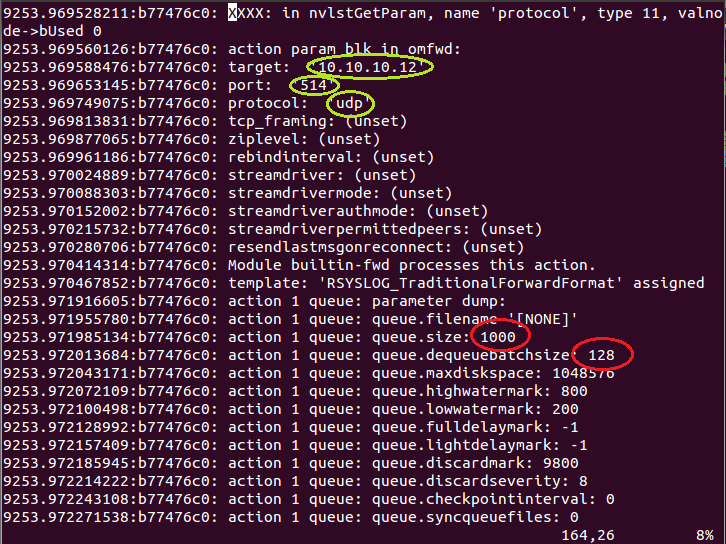 This screenshot is a excerpt of the debug log. I marked several positions. The green circles show, that the action parameters have been used correctly. The red circles show two of the action queues parameters, where the defaults have been used. This is just a example on how to identify, if your configuration was loaded successfully.
rsyslog 6.3.11 (v6-beta) released
This is a new beta release for the v6 branch. It only contains bugfixes. For more details, please take a look into the ChangeLog.
ChangeLog:
http://www.rsyslog.com/changelog-for-6-3-11-v6-beta/
Download:
http://www.rsyslog.com/rsyslog-6-3-11-beta/
As always, feedback is appreciated.
Best regards,
Florian Riedl
rsyslog 6.3.11 (beta)
Download file name: rsyslog 6.3.11 (beta)
rsyslog 6.3.11 (beta)
md5sum: 7dc50714e15f9b796c74c4b1b3ed8ba8
Author: Rainer Gerhards (rgerhards@adiscon.com)
Version: 6.3.11 File size: 2.52 MB
rsyslog 6.2.2 (v6-stable) released
This is a bug-fixing release. Updating is recommended for users of the v6-stable branch. New users please note that in order to build this release, libestr, libee and optionally liblognorm (for mmnormalize) is required.
For more information about the fixes, please refer to the ChangeLog.
ChangeLog:
http://www.rsyslog.com/changelog-for-6-2-2-v6-stable/
Download:
http://www.rsyslog.com/rsyslog-6-2-2-v6-stable/
As always, feedback is appreciated.
Best regards,
Florian Riedl
rsyslog 6.2.2 (v6-stable)
Download file name: rsyslog 6.2.2 (stable)
rsyslog 6.2.2 (stable)
md5sum: b797b8222d6ea4d5dfa007efe8aafa7f
Author: Rainer Gerhards (rgerhards@adiscon.com)
Version: 6.2.2 File size: 2.432 MB
Changelog for 6.2.2 (v6-stable)
Version 6.2.2 [v6-stable], 2012-06-13
- build system improvements and spec file templates
Thanks to Abby Edwards for providing these enhancements - bugfix: disk queue was not persisted on shutdown, regression of fix to
http://bugzilla.adiscon.com/show_bug.cgi?id=299
The new code also handles the case of shutdown of blocking light and full delayable sources somewhat smarter and permits, assuming sufficient timouts, to persist message up to the max queue capacity. Also some nits in debug instrumentation have been fixed. - bugfix: –enable-smcustbindcdr configure directive did not work
closes: http://bugzilla.adiscon.com/show_bug.cgi?id=330
Thanks to Ultrabug for the patch. - add small delay (50ms) after sending shutdown message. There seem to be cases where the shutdown message is otherwise not processed, not even on an idle system.
Thanks to Marcin for bringing this problem up. - support for resolving huge groups
closes: http://bugzilla.adiscon.com/show_bug.cgi?id=310
Thanks to Alec Warner for the patch - bugfix: potential hang due to mutex deadlock
closes: http://bugzilla.adiscon.com/show_bug.cgi?id=316
Thanks to Andreas Piesk for reporting&analyzing this bug as well as providing patches and other help in resolving it. - bugfix: property PROCID empty instead of proper nilvalue if not present
If it is not present, it must have the nilvalue “-” as of RFC5424
closes: http://bugzilla.adiscon.com/show_bug.cgi?id=332
Thanks to John N for reporting this issue. - bugfix: did not compile under solaris due to $uptime property code
For the time being, $uptime is not supported on Solaris - bugfix: “last message repeated n times” message was missing hostname
Thanks to Zdenek Salvet for finding this bug and to Bodik for reporting
rsyslog 5.8.12 (v5-stable) released
This is primarily a maintenance release. It includes several bugfixes for omudpspoof, debugging or disk queues as well as other fixes. For more details, please review the changelog.
ChangeLog:
http://www.rsyslog.com/changelog-for-5-8-12-v5-stable/
Download:
http://www.rsyslog.com/rsyslog-5-8-12-v5-stable/
As always, feedback is appreciated.
Best regards,
Florian Riedl