
RSyslog Windows Agent 8.0 Released
Adiscon is pleased to announce the release of Rsyslog Windows Agent 8.0.0 Build 230.
This update focuses on enhancing functionality and modernizing the platform. It introduces DTLS Action support, enabling secure logging over UDP, and adds microseconds to timestamps, improving RFC5424 compliance. The OpenSSL library has been upgraded, ensuring compatibility with the latest security protocols, including TLS v1.3.
For greater flexibility, RELP Action now supports custom output encoding.
Detailed information can be found in the version history.
RSyslog Windows Agent 7.5c Released
Release Date: 2024-10-06
Build-IDs: Service 7.5.0.228, Client 7.4.0.315
Bugfixes |
|
You can download Free Trial Version of RSyslog Windows Agent.
RSyslog Windows Agent 7.5c Released
Adiscon is pleased to announce the release of Rsyslog Windows Agent 7.5c Build 228.
This update enhances the stability and performance of our log processing services. Key improvements include a fix for a memory leak in RFC5424 Syslog Header processing.
Detailed information can be found in the version history.
What to do when an External Script does not work?
When a script runs fine interactively but fails in the rsyslog context (i.e., when executed by a background process or as part of a service) it typically indicates differences between the interactive environment and the service environment. Most importantly, it is not rsyslog itself you need to look at. Check the system config and debug your script so that you can obtain maximum information on why and when it fails.
If you know exactly that rsyslog cannot start the script, check that it has sufficient permissions and that all pathes are correct (use absolute pathes!).
Besides that general advice, here are some common reasons why the problem can happen and suggestions for debugging:
Continue reading “What to do when an External Script does not work?”RSyslog Windows Agent 7.5b Released
Release Date: 2024-08-22
Build-IDs: Service 7.5.0.227, Client 7.4.0.315
Bugfixes |
|
You can download Free Trial Version of RSyslog Windows Agent.
RSyslog Windows Agent 7.5b Released
Adiscon is pleased to announce the release of Rsyslog Windows Agent 7.5 Build 227.
This update enhances stability and performance in the EventLog Monitor V2 Service. Key improvements include better handling of XML data and increased support for larger XML attribute values.
Detailed information can be found in the version history.
Version 7.5b is a free download. Customers with existing 6.x keys can contact our Sales department for upgrade prices. If you have a valid Upgrade Insurance ID, you can request a free new key by sending your Upgrade Insurance ID to sales@adiscon.com. Please note that the download enables the free 30-day trial version if used without a key – so you can right now go ahead and evaluate it.
rsyslog on AWS – Update an existing CloudFormation stack
Welcome to this guide on updating an existing CloudFormation stack for the rsyslog server on AWS. In this tutorial, we will walk you through the steps necessary to ensure your rsyslog server is running the latest version with all the benefits of updated features and performance improvements. We will provide detailed instructions and screenshots to make the update process straightforward, ensuring minimal disruption to your logging setup. Whether you’re a seasoned AWS user or new to CloudFormation, this guide will help you achieve a smooth and efficient update.
Prerequisites
If changes were made to the rsyslog configuration, use the guide in this article to back up and restore configuration: AWS rsyslog Sync Configuration with S3.
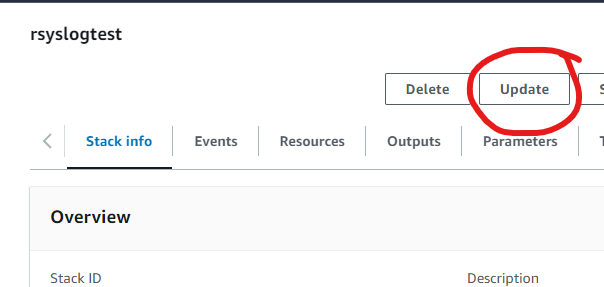
Step 1: Select the CloudFormation Stack
To begin the update process for your rsyslog server on AWS, first, navigate to the AWS Management Console and go to the CloudFormation section. Here, locate the stack you wish to update.
- Visit AWS CloudFormation: Log in to your AWS Management Console and go to the CloudFormation service.
- Select Your Stack: Identify and select the CloudFormation stack for your rsyslog server. In this example, the stack is named “rsyslogtest”.
- Initiate Update: Click on the Update button, as highlighted in the screenshot above.
This will start the process to update your existing CloudFormation stack.
Click Update to proceed.
Step 2: Prepare the Template
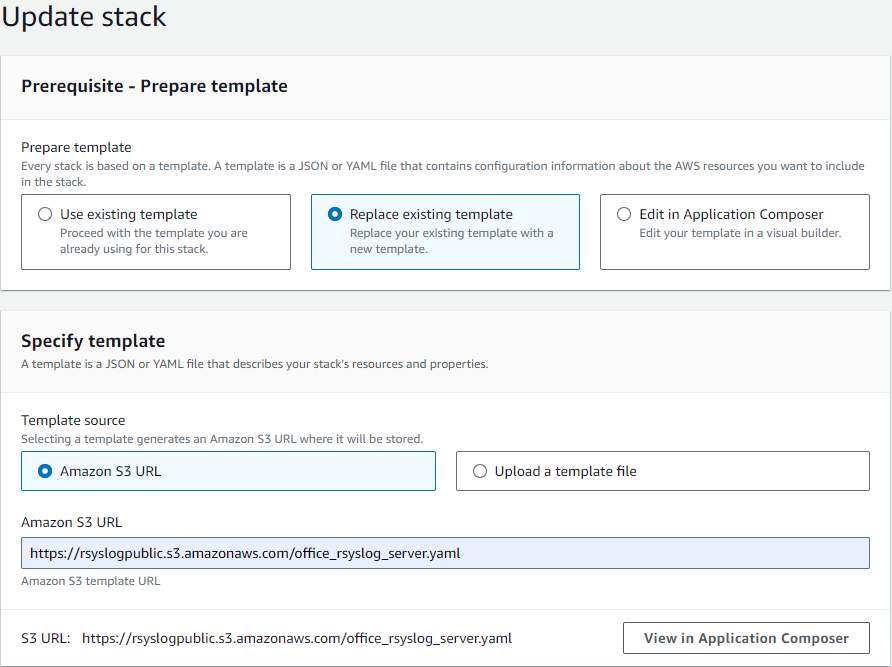
After selecting the stack to update, the next step involves preparing the template for the update. Follow these instructions:
- Choose Template Option: In the “Prepare template” section, select the Replace existing template option.
- Specify Template Source: Under “Template source”, choose Amazon S3 URL.
- Enter S3 URL: Enter the following URL in the provided field:
https://rsyslogpublic.s3.amazonaws.com/office_rsyslog_server.yamlAlternatively, you can use the template URL provided on the AWS Marketplace product page for the rsyslog server.
This will prepare the new template to be applied to your existing stack.
Click Next to proceed.
Step 3: Specify Stack Details
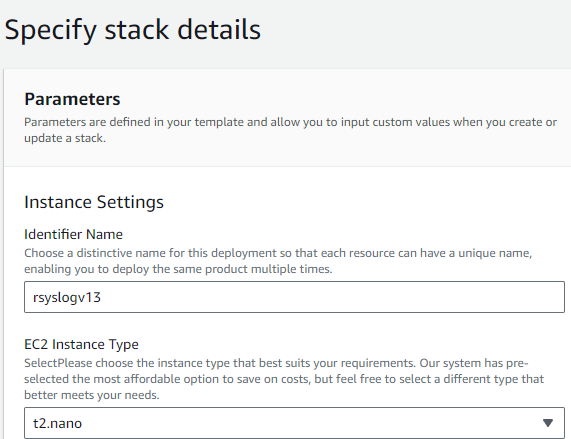
After preparing the template, proceed to specify the stack details:
- Review Parameters: Ensure all parameters are correct. Adjust as necessary.
- Instance Settings:
- Identifier Name: Change if necessary.
- EC2 Instance Type: Change if necessary, as a new instance will be deployed.
Review all options carefully in case new features have been added.
Once all configurations are reviewed and adjusted, click Next to proceed.
Step 4: Configure Stack Options and Review
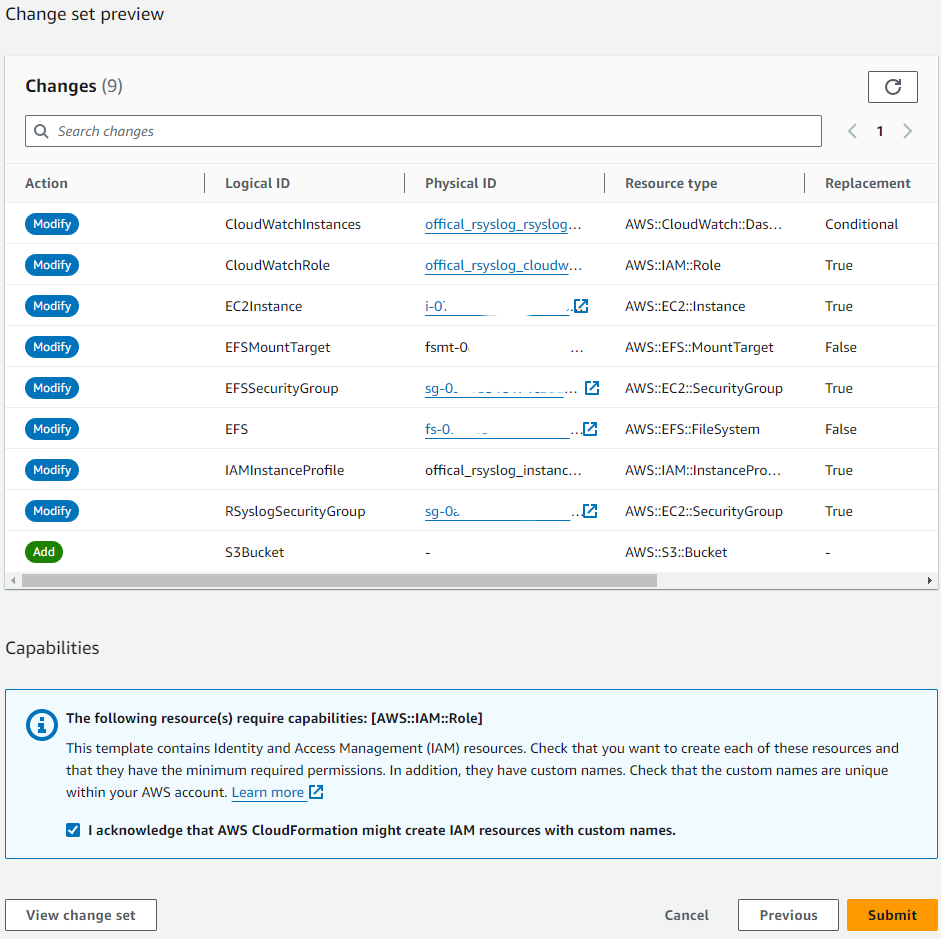
Review the stack options and make any necessary adjustments.
- Review Changes: Carefully review the list of changes in the “Change set preview”. Ensure all modifications align with your expectations.
- Submit: Once everything is reviewed and confirmed, click the Submit button to start the update process.
After clicking Submit, AWS will begin updating your CloudFormation stack. Monitor the progress to ensure the update completes successfully. If any issues arise, refer to the stack events for troubleshooting.
Step 5: Monitor the Update Process
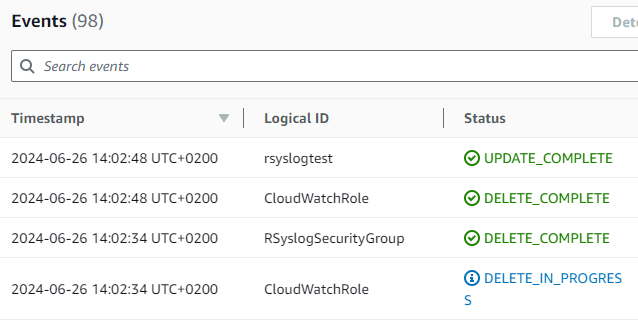
- Monitor Progress: Check the events tab to monitor the progress of the update. The status should show “UPDATE_IN_PROGRESS” and various components being modified.
- Confirm Completion: When the update completes, ensure the status changes to “UPDATE_COMPLETE”.
Once the process is complete, verify that the CloudFormation stack was updated successfully by checking the final status and confirming that all intended changes were applied correctly.
Confirm EC2 Instance Running rsyslog Server
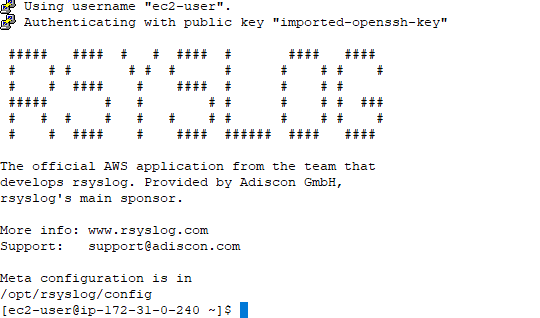
- Access the EC2 Instance: Use SSH to log in to your EC2 instance running the rsyslog server.
- Verify rsyslog: Once logged in, confirm that the rsyslog server is running properly. You should see the rsyslog welcome message, indicating that the application is installed and operational.
Check the rsyslog meta configuration located in /opt/rsyslog/config to ensure all settings are correct and the service is functioning as expected. This final verification confirms the successful update of your CloudFormation stack and the deployment of the new rsyslog server instance.
rsyslog on AWS – Version changelog
S2: v13 rsyslog
We are excited to announce the second public release of Rsyslog Server on AWS Marketplace. This version includes efficient logging, noise event filtering, and a streamlined web interface for system management. New features: Cloudwatch LogGroups, logfile compression, S3 log/config storage, enhanced CloudFormation support, and improved AWS region handling. Experience enhanced logging capabilities and simplified management with Rsyslog Server.
Key Features:
- Cloudwatch LogGroups Integration: Now you can leverage AWS Cloudwatch LogGroups for better log management and analysis directly through our CloudFormation templates.
- Logfile Compression: Enabled logfile compression to optimize storage and improve performance.
- S3 Bucket Support: Added S3 support for both log storage and configuration backup, ensuring your data is safely stored and easily accessible.
- Improved AWS Region Handling: Fixed issues with AWS_REGION in rsyslogctl to automatically use the correct region configuration.
- Configuration Sync to S3: Fixed the sync_config_history_to_s3 feature, ensuring your configuration history is consistently backed up.
- Enhanced CloudFormation Features: Added new features, including S3 support, access policies, and additional InstanceTypes, to our CloudFormation file for easier and more flexible deployments.
- EFS Resource Management: Added Delete and Retain policies to EFS resources to ensure they survive a Stack Update.
S2: v12 rsyslog
We are excited to announce the inaugural public release of the official Rsyslog Server product on AWS Marketplace. This release introduces an efficient logging solution right out of the box. Additionally, it empowers users with seamless configuration options to filter out noise events and includes a streamlined web interface for system operation management. Get ready for enhanced logging capabilities and simplified management with the Rsyslog Server.
rsyslog on AWS – Sync Configuration with S3
Ensuring the integrity and availability of your rsyslog configuration is crucial for maintaining a robust logging system. By syncing your rsyslog configuration to AWS S3, you create a reliable backup that can be easily restored when needed. This guide will walk you through the process of syncing your rsyslog configuration to S3 and restoring it when necessary.
Prerequisites
Before you begin, ensure you have the following:
- rsyslog server from AWS Marketplace with at least Version S2: v13 rsyslog
- S3Bucket (Is created by default since S2: v13 rsyslog or higher).
Syncing Configuration History to S3
This command synchronizes the current rsyslog configuration history to a specified S3 bucket. It ensures all configuration changes are backed up, providing a reliable recovery solution.
sudo rsyslogctl sync-config-history-to-s3
When executed, this command uploads your rsyslog configuration history to the S3 bucket configured in your settings. Regular execution of this command, especially after making significant changes, ensures your backups are always current.
Restoring Configuration from S3
This command downloads the rsyslog configuration history from an S3 bucket to the local machine, facilitating configuration restoration.
sudo rsyslogctl sync-s3-to-config-history
Executing this command retrieves the configuration history from S3 and applies it to your local rsyslog setup.
RSyslog Windows Agent 7.5a Released
Release Date: 2024-05-29
Build-IDs: Service 7.5.0.226, Client 7.4.0.315
Bugfixes |
|
You can download Free Trial Version of RSyslog Windows Agent.