
Revitalizing Rsyslog with Docker: A New Era of Log Management
We’re excited to announce a renewed focus on the rsyslog Docker project, bringing you robust, flexible, and easy-to-use containerized solutions for your logging needs. This isn’t just a refresh; it’s a reimagining of how rsyslog can integrate into modern, containerized environments.
How To Export the Configuration and Create a Debug Log File
This Article describes you how you can export the configuration of your program and create a debug file. These are needed for troubleshooting.
The Article is applicable to Rsyslog Windows Agent, EventReporter, MonitorWare Agent and WinSyslog.
Continue reading “How To Export the Configuration and Create a Debug Log File”
RSyslog Windows Agent 8.0 Released
Release Date: 2025-01-23
Build-IDs: Service 8.0.0.230, Client 8.0.0.320
Enhancements |
|
Bugfixes |
|
You can download Free Trial Version of RSyslog Windows Agent.
RSyslog Windows Agent 8.0 Released
Adiscon is pleased to announce the release of Rsyslog Windows Agent 8.0.0 Build 230.
This update focuses on enhancing functionality and modernizing the platform. It introduces DTLS Action support, enabling secure logging over UDP, and adds microseconds to timestamps, improving RFC5424 compliance. The OpenSSL library has been upgraded, ensuring compatibility with the latest security protocols, including TLS v1.3.
For greater flexibility, RELP Action now supports custom output encoding.
Detailed information can be found in the version history.
RSyslog Windows Agent 7.5c Released
Release Date: 2024-10-06
Build-IDs: Service 7.5.0.228, Client 7.4.0.315
Bugfixes |
|
You can download Free Trial Version of RSyslog Windows Agent.
RSyslog Windows Agent 7.5c Released
Adiscon is pleased to announce the release of Rsyslog Windows Agent 7.5c Build 228.
This update enhances the stability and performance of our log processing services. Key improvements include a fix for a memory leak in RFC5424 Syslog Header processing.
Detailed information can be found in the version history.
What to do when an External Script does not work?
When a script runs fine interactively but fails in the rsyslog context (i.e., when executed by a background process or as part of a service) it typically indicates differences between the interactive environment and the service environment. Most importantly, it is not rsyslog itself you need to look at. Check the system config and debug your script so that you can obtain maximum information on why and when it fails.
If you know exactly that rsyslog cannot start the script, check that it has sufficient permissions and that all pathes are correct (use absolute pathes!).
Besides that general advice, here are some common reasons why the problem can happen and suggestions for debugging:
Continue reading “What to do when an External Script does not work?”RSyslog Windows Agent 7.5b Released
Release Date: 2024-08-22
Build-IDs: Service 7.5.0.227, Client 7.4.0.315
Bugfixes |
|
You can download Free Trial Version of RSyslog Windows Agent.
RSyslog Windows Agent 7.5b Released
Adiscon is pleased to announce the release of Rsyslog Windows Agent 7.5 Build 227.
This update enhances stability and performance in the EventLog Monitor V2 Service. Key improvements include better handling of XML data and increased support for larger XML attribute values.
Detailed information can be found in the version history.
Version 7.5b is a free download. Customers with existing 6.x keys can contact our Sales department for upgrade prices. If you have a valid Upgrade Insurance ID, you can request a free new key by sending your Upgrade Insurance ID to sales@adiscon.com. Please note that the download enables the free 30-day trial version if used without a key – so you can right now go ahead and evaluate it.
rsyslog on AWS – Update an existing CloudFormation stack
Welcome to this guide on updating an existing CloudFormation stack for the rsyslog server on AWS. In this tutorial, we will walk you through the steps necessary to ensure your rsyslog server is running the latest version with all the benefits of updated features and performance improvements. We will provide detailed instructions and screenshots to make the update process straightforward, ensuring minimal disruption to your logging setup. Whether you’re a seasoned AWS user or new to CloudFormation, this guide will help you achieve a smooth and efficient update.
Prerequisites
If changes were made to the rsyslog configuration, use the guide in this article to back up and restore configuration: AWS rsyslog Sync Configuration with S3.
Step 1: Select the CloudFormation Stack
To begin the update process for your rsyslog server on AWS, first, navigate to the AWS Management Console and go to the CloudFormation section. Here, locate the stack you wish to update.
- Visit AWS CloudFormation: Log in to your AWS Management Console and go to the CloudFormation service.
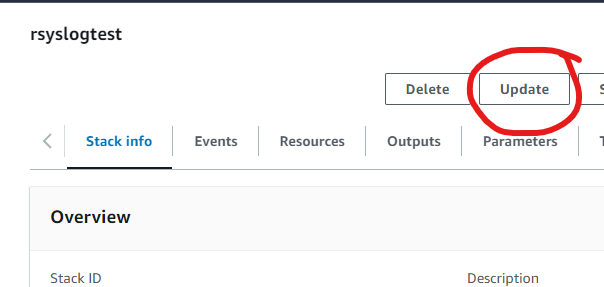
- Select Your Stack: Identify and select the CloudFormation stack for your rsyslog server. In this example, the stack is named “rsyslogtest”.
- Initiate Update: Click on the Update button, as highlighted in the screenshot above.
This will start the process to update your existing CloudFormation stack.
Click Update to proceed.
Step 2: Prepare the Template
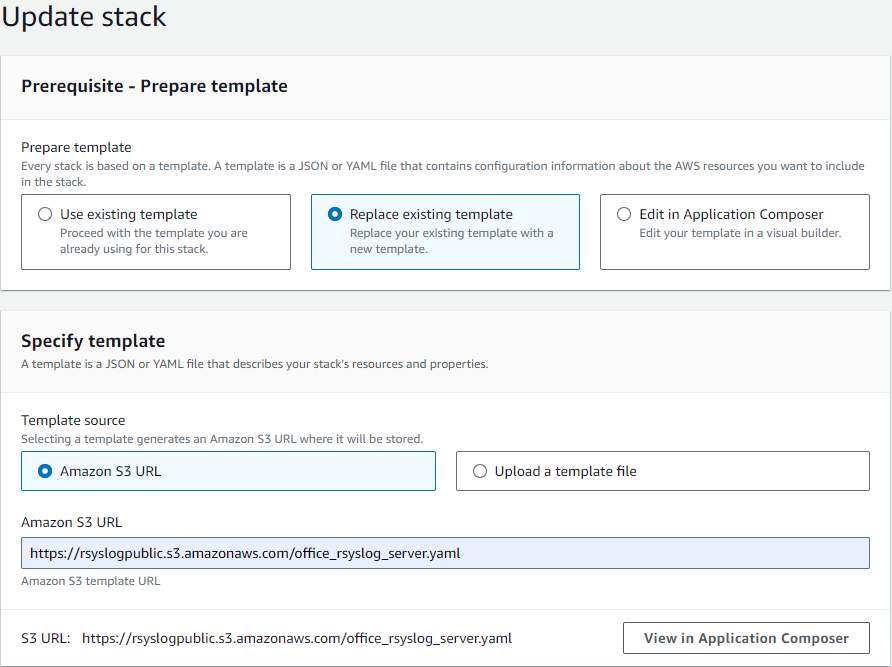
After selecting the stack to update, the next step involves preparing the template for the update. Follow these instructions:
- Choose Template Option: In the “Prepare template” section, select the Replace existing template option.
- Specify Template Source: Under “Template source”, choose Amazon S3 URL.
- Enter S3 URL: Enter the following URL in the provided field:
https://rsyslogpublic.s3.amazonaws.com/office_rsyslog_server.yamlAlternatively, you can use the template URL provided on the AWS Marketplace product page for the rsyslog server.
This will prepare the new template to be applied to your existing stack.
Click Next to proceed.
Step 3: Specify Stack Details
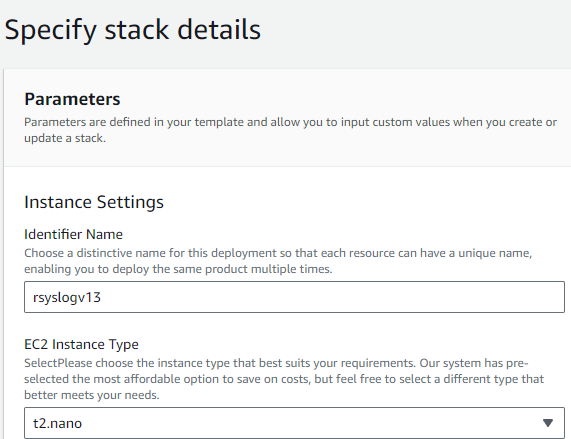
After preparing the template, proceed to specify the stack details:
- Review Parameters: Ensure all parameters are correct. Adjust as necessary.
- Instance Settings:
- Identifier Name: Change if necessary.
- EC2 Instance Type: Change if necessary, as a new instance will be deployed.
Review all options carefully in case new features have been added.
Once all configurations are reviewed and adjusted, click Next to proceed.
Step 4: Configure Stack Options and Review
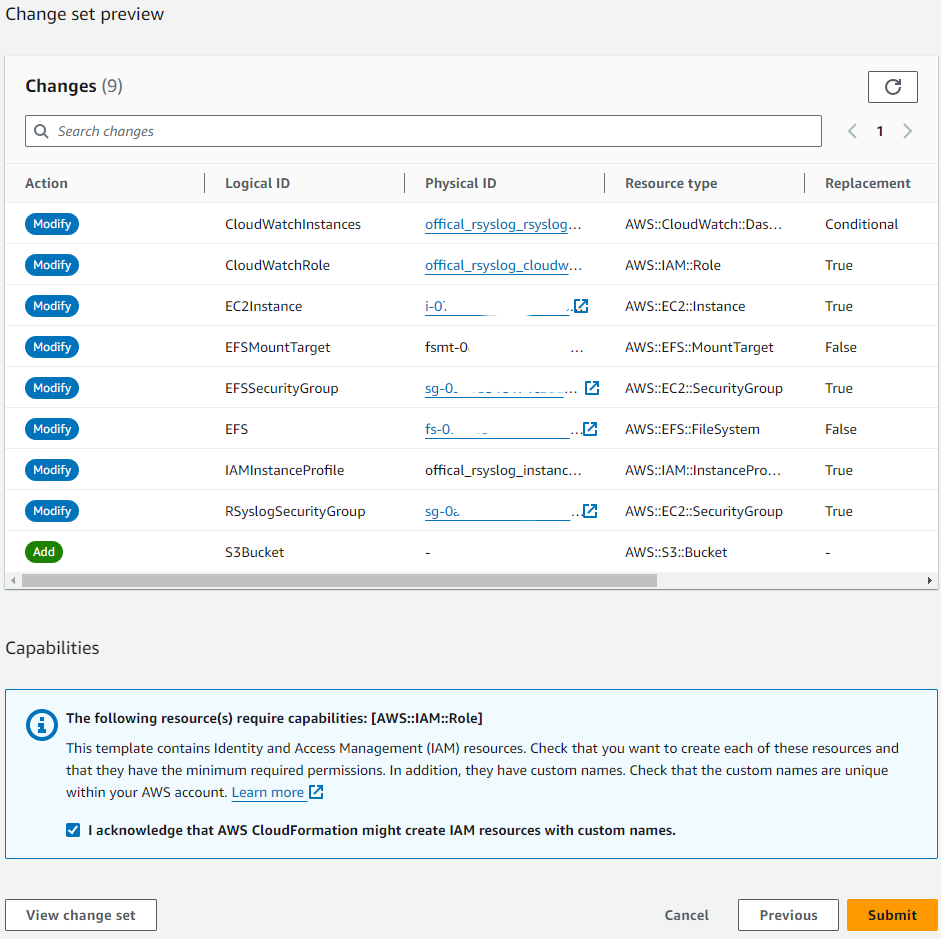
Review the stack options and make any necessary adjustments.
- Review Changes: Carefully review the list of changes in the “Change set preview”. Ensure all modifications align with your expectations.
- Submit: Once everything is reviewed and confirmed, click the Submit button to start the update process.
After clicking Submit, AWS will begin updating your CloudFormation stack. Monitor the progress to ensure the update completes successfully. If any issues arise, refer to the stack events for troubleshooting.
Step 5: Monitor the Update Process
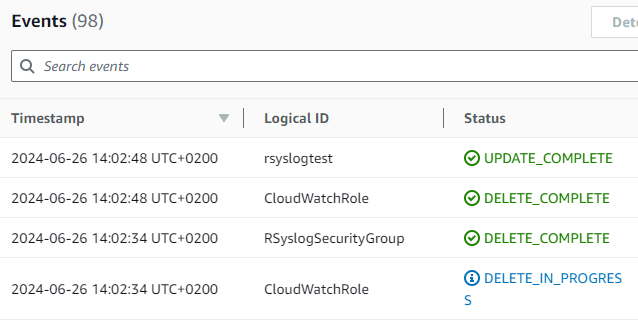
- Monitor Progress: Check the events tab to monitor the progress of the update. The status should show “UPDATE_IN_PROGRESS” and various components being modified.
- Confirm Completion: When the update completes, ensure the status changes to “UPDATE_COMPLETE”.
Once the process is complete, verify that the CloudFormation stack was updated successfully by checking the final status and confirming that all intended changes were applied correctly.
Confirm EC2 Instance Running rsyslog Server
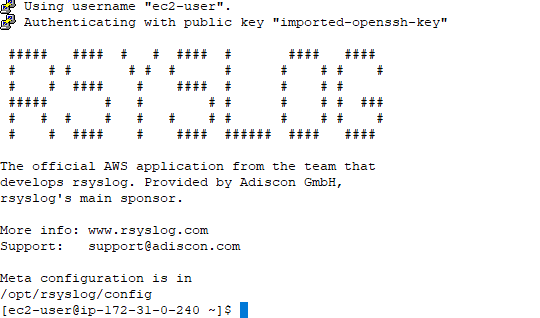
- Access the EC2 Instance: Use SSH to log in to your EC2 instance running the rsyslog server.
- Verify rsyslog: Once logged in, confirm that the rsyslog server is running properly. You should see the rsyslog welcome message, indicating that the application is installed and operational.
Check the rsyslog meta configuration located in /opt/rsyslog/config to ensure all settings are correct and the service is functioning as expected. This final verification confirms the successful update of your CloudFormation stack and the deployment of the new rsyslog server instance.