
rsyslog Windows Agent 26.10 Technical Release Notes
Release date: October 7, 2026
Service build: 26.10.0.354
Configuration Client build: 26.10.0.443
User Interface build: 26.10.0.1018
Upgrade assessment
Recommendation: Recommended update
Why update now: This release updates included OpenSSL libraries to 3.5.9 and corrects configuration editing and service diagnostics in the User Interface.
If you defer: Existing processing continues, but included OpenSSL libraries stay on the previous update, and the configuration-editing and diagnostic corrections in this release remain absent.
Who benefits most: Administrators who use TLS and anyone who edits configuration or follows service diagnostics in the User Interface.
Upgrade and verification: Update rsyslog Windows Agent using the normal supported upgrade path. Confirm that the installed service version is 26.10.0.354. Test the changed functions that are relevant to your deployment.
Important changes
OpenSSL 3.5.9
- Change: The included OpenSSL libraries are updated to 3.5.9.
- Operational impact: TLS-using actions and services run with the updated library.
- Applies to: All rsyslog Windows Agent installations.
- Verification: After upgrade, confirm the installed service build and exercise one TLS-using function you rely on.
Configuration interface and diagnostics
- Change: Workbench edits are validated before saving, and the previous document is restored when a save fails. Leaving the page, reloading, switching the configuration source, or restarting asks whether to save or discard unsaved changes. Move rule up moves the selected rule when two rule names differ only by punctuation. Failures from an older remote registry session are ignored, and service commands that would change a remote target are blocked. Empty optional allowed-peer and TLS rows no longer block other edits. Configuration-tree navigation is denser, selection feedback is clearer, and license file path handling is clearer. The empty Advanced page is removed. Debug-log follow stays with appended lines and a replaced log file.
- Operational impact: Configuration edits are less likely to be lost or applied to the wrong rule, and commands that would change a remote target are blocked.
- Applies to: rsyslog Windows Agent installations using the User Interface for configuration or service diagnostics.
- Verification: Save a valid edit and a failing edit, move two rules whose names differ only by punctuation, and follow a debug log while new lines are appended.
User Interface
- Workbench edits are validated before saving. If a save fails, the previous document is restored.
- Leaving the page, reloading, switching the configuration source, or restarting asks whether to save or discard unsaved changes.
- Move rule up moves the selected rule when two rule names differ only by punctuation.
- Failures from an older remote registry session are ignored, and service commands that would change a remote target are blocked.
- Empty optional allowed-peer and TLS rows no longer block other edits to the selected service.
- Configuration-tree navigation is denser, selection feedback is clearer, and license file path handling is clearer.
- The empty Advanced page is removed.
- Debug-log follow stays in view when lines are appended or the log file is replaced.
Partner deployment notes
Availability: Use the canonical rsyslog Windows Agent download and this Technical Release Notes page as the release reference; do not use temporary build links as the long-term reference.
Localization: The User Interface translation workflow is being prepared. Translation strings and contribution guidance will be published in the Adiscon community repository when available.
Partner verification: Confirm the installed service, Configuration Client, and User Interface builds. Save a configuration change in the User Interface and, where relevant, exercise one TLS-using function.
Related links
rsyslog Windows Agent 26.09: Monthly Patch + Feature Drop
rsyslog Windows Agent 26.09 is the latest monthly Patch + Feature Drop. It focuses on dependable service operation and smoother configuration administration.
More dependable service operation
The service now keeps a stop request effective even when it overlaps a configuration reload. Services installed with a custom Windows service name also start more reliably.
Smoother configuration administration
The User Interface preserves unsaved configuration changes when you restart as administrator, so you can review and save your work after elevation. After local metrics setup, standard users can reload their configuration without needing to restart as administrator. This release also includes stability maintenance for timestamp and configuration handling.
The User Interface remains in preview. It is available for production use with appropriate care and review; the Configuration Client remains fully supported.
We recommend keeping rsyslog Windows Agent on the latest Patch + Feature Drop to benefit from current maintenance and product improvements. Your licence remains valid for releases in its calendar year; Upgrade Insurance provides entitlement to later calendar years and their monthly Patch + Feature Drops.
Read the Technical Release Notes for rsyslog Windows Agent 26.09 for detailed upgrade guidance, product scope, and verification steps.
rsyslog Windows Agent 26.09 Technical Release Notes
Release date: September 1, 2026
Service build: 26.9.0.353
Configuration Client build: 26.9.0.442
User Interface build: 26.9.0.1017
Upgrade assessment
Recommendation: Recommended update
Why update now: This release corrects service-stop handling during configuration reload, startup of custom-named Windows services, and a timestamp-conversion crash. It also improves administration through the User Interface metrics dashboard.
If you defer: Installations retain the service-operation and timestamp-conversion limitations addressed by this release, as well as the earlier User Interface administration behaviour.
Who benefits most: Administrators who reload configuration, use custom Windows service names, or use the User Interface metrics dashboard.
Upgrade and verification: Update using the normal supported path. Confirm service build 26.9.0.353, reload configuration in a controlled maintenance window, verify a custom service name where used, and reload the User Interface dashboard after Metrics Helper setup.
Important changes
Service operation and reliability
- Change: Stop requests are retained during configuration reload, and services with custom Windows service names start reliably.
- Operational impact: Reduces avoidable disruption during service administration and maintenance.
- Applies to: rsyslog Windows Agent installations that reload configuration or use custom service names.
- Verification: Reload configuration and, where applicable, stop/start the custom-named service during a controlled maintenance window.
Timestamp conversion reliability
- Change: A crash while converting certain read-only timestamp properties is corrected.
- Operational impact: Improves reliability for configurations that process these timestamp properties.
- Applies to: rsyslog Windows Agent configurations using the affected timestamp conversion path.
- Verification: Process a representative test message that uses the relevant timestamp property.
Configuration Client and User Interface
- After local Metrics Helper setup, standard users can reload the User Interface metrics dashboard.
- Service-owned older General settings no longer produce unnecessary unknown-configuration indications.
Published errata and known issues
Installer-update reliability: ERR-2026-002: rsyslog Windows Agent update reports success but program files are not upgraded correctly is resolved in the 26.09 setup release. After a direct upgrade from an earlier product generation, confirm that the installed service reports 26.9.0.353 and that the Configuration Client and the required features are present.
Related links
rsyslog Windows Agent 2026 — New major release, new licensing, new release cycle
Overview
rsyslog Windows Agent now ships on the 26.07 line (July 2026). This release line uses calendar-based YY.MM version numbers, a monthly update cadence, a license.alic license file, and a next-generation Configuration Client Preview in the installer.
If you are upgrading from rsyslog Windows Agent 8.x (or earlier), read this article before you deploy. Your existing registration name and numeric license keys do not apply on current builds—you need a new license.alic file from Adiscon.
A new way to read version numbers
Older product lines (through 8.x)
Historically, rsyslog Windows Agent used sequential version numbers that increased independently of the calendar. Different Adiscon products used different leading numbers (WinSyslog 18, EventReporter 19, MonitorWare Agent 15, and so on).
| Component | Legacy (8.x) | New (YY.MM) |
|---|---|---|
| Example | 8.3.0.236 | 26.07 |
| Year part | Sequential major 8 | Calendar year short form 26 (2026) |
| Month part | Feature release (e.g. 3) | Release month 07 = July |
Current YY.MM versions
Adiscon changed to calendar-based version numbers. In 26.07, 26 means 2026 and 07 means July. There are no missing intermediate product releases between the last 8.x builds and 26.07.
Later monthly builds in the same year continue as 26.08, 26.09, and so on. When the calendar year rolls forward, the year part advances (for example to 27.01).
New release cycle: monthly updates
Adiscon is aligning rsyslog Windows Agent with a predictable monthly rhythm:
- YY = calendar year (26 = 2026)
- MM = release month (01 = January, 07 = July, 12 = December)
- Regular monthly builds with fixes and improvements during the year
The current general-availability line for this announcement is 26.07 (July). You can plan upgrades knowing that 26.08, 26.09, and so on will arrive through the year. Detailed change lists belong in release notes, not in this overview.
Licensing: from name + keys to a license file
The largest operational change for upgrades from rsyslog Windows Agent 8.x is licensing. Older builds used a registration name and numeric license keys. Current builds use a license.alic file applied under General → License in the configuration client.
| Topic | Older product lines | Current builds |
|---|---|---|
| What you apply | Registration name + numeric license keys | license.alic file |
| Where in the client | License key fields | General → License |
| Optional path | N/A | szLicenseV2Path (path to the file) |
Important: Keys from rsyslog Windows Agent 8.x do not apply on current builds. Contact Adiscon support or sales to obtain a new license.alic for your edition.
Licensing
License file details and how to apply it
What you use now
| File name | license.alic |
| Default location | %ProgramData%\Adiscon\RSyslogAgent\license.alic |
| Configuration | szLicenseV2Path — optional path to the file (path only, not license text) |
| Client location | General → License |
Editions (Basic, Professional, Enterprise) still exist as commercial labels. Product limits such as Remote Event Log and client connections are enforced from entitlements in the license file. The main window status bar shows license status (for example, the licensed organization). A version mismatch between the license file and the installed service may show a warning banner until you apply a matching license.
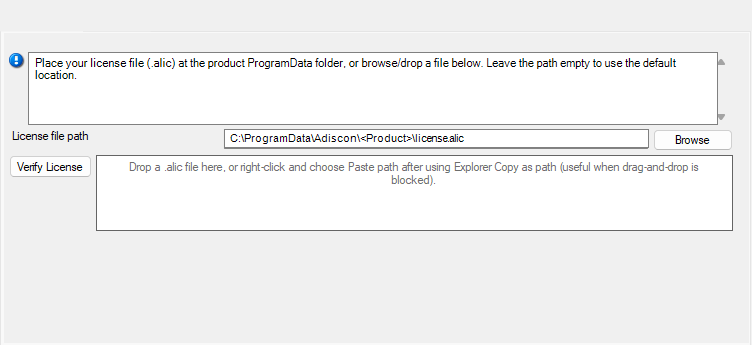
How to apply the license file
- Obtain license.alic from Adiscon for rsyslog Windows Agent (correct edition and entitlements).
- Open the configuration client and select General → License.
- Browse for license.alic, drag-and-drop the file, or paste the file path.
- Use Verify License if you want to check the selected file before or after saving.
- Save the configuration.
- Restart the service so the updated license state is applied.
Configuration snippet (optional)
Administrators using file-based configuration may set an explicit path when they do not use the default location:
szLicenseV2Path C:\ProgramData\Adiscon\RSyslogAgent\license.alic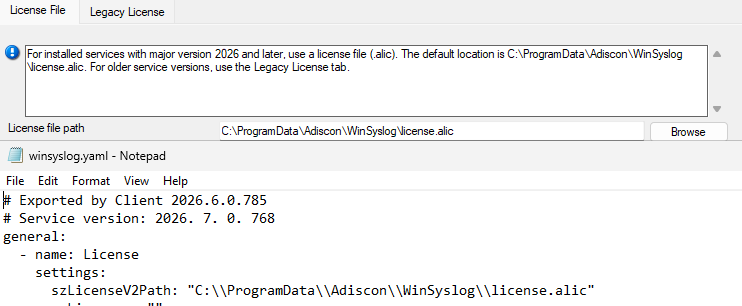
Frequently asked questions (licensing)
Do my 8.x license keys work on current builds?
No for activating current rsyslog Windows Agent builds. Current builds require a license.alic file. Contact Adiscon to obtain one.
Can I use an older product version with my current license?
Yes. Your license can cover older product versions. If the older version does not support license files, contact Adiscon support or sales and request a free license key for that product version.
Can I copy license.alic from another product?
No. Each license is issued for specific product SKUs (RSyslog-WA-Basic, RSyslog-WA-Pro, RSyslog-WA-Enter). The service rejects mismatched products.
What if license.alic is missing?
Without a valid license file, the product follows its normal unlicensed or evaluation behavior for that edition. Apply a valid license.alic under General → License, save, and restart the service.
Do I need internet activation?
No for normal operation. The license file is validated on the machine; you do not need online activation for routine use.
Upgrade
Upgrade path and compatibility
Upgrade planning for rsyslog Windows Agent 8.x to current builds should start with a license.alic request before production rollout. Install or upgrade to 26.07 (July) or a later 26.x monthly build.
Note: The rsyslog Windows Agent is Adiscon’s native Windows agent for rsyslog-compatible deployments—it is not the open-source Linux rsyslog project.
Next-generation Configuration Client Preview
The rsyslog Windows Agent installer for current builds includes two configuration clients:
- Established configuration client — familiar UI, updated for the license file page under General → License.
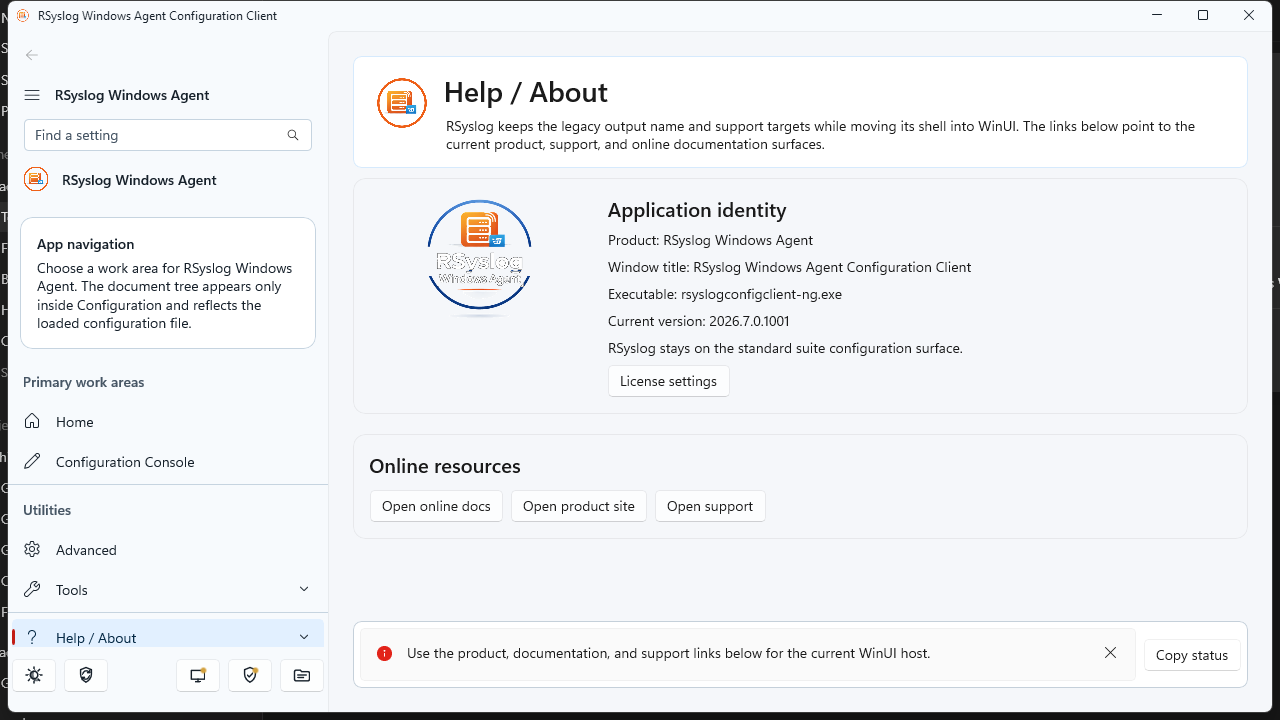
- Next-generation Configuration Client Preview — modern WinUI-based workbench (adiscon-client-ng), shipped as a preview alongside the classic client.
The preview is intended for early adopters. Both clients target the same service and the same license.alic file. Expect the preview label until Adiscon declares general availability.
What changed between 8.x and current builds (overview)
Current builds are a platform refresh, not a single-feature update. Alongside YY.MM versioning and monthly updates, they introduce a license.alic license file, expanded file/YAML configuration options, operational metrics (disabled by default), installer improvements, and ongoing reliability hardening across listeners, actions, and the core engine. For detailed changes in a specific month build, see the product release notes for 26.07 and later.
rsyslog Windows Agent continues to focus on reliable Windows log ingestion and forwarding in rsyslog-compatible deployments; the current line modernizes how you license, version, and configure the product. This is Adiscon’s Windows agent only—not the Linux rsyslog project.
Frequently asked questions (upgrade)
Where is the license file?
Default: %ProgramData%\Adiscon\RSyslogAgent\license.alic
Is the nextgen client required?
No. It is a preview. The classic configuration client remains supported for applying license.alic.
Where should backup tools copy the license?
Back up license.alic together with your configuration directory under the product’s ProgramData folder.
Next steps
- Existing customers: Contact Adiscon support or sales to request your license.alic before or during upgrade.
- New deployments: Install 26.07 or later, apply license.alic under General → License, verify status, then roll out rules and services as usual.
- Monthly updates: Check release notes for 26.07, 26.08, and subsequent monthly builds.
Rsyslog Windows Agent 8.4 Released
A new version of the rsyslog Windows Agent is now available. Version 8.4.0 brings native configuration import/export options, improved service stability, and multiple client bug fixes.

Core Service Engine Updates
In the core engine, a critical concurrency fix has been applied to both the Syslog and RELP forwarding actions. The update resolves shared disk-queue rewrite race conditions that previously occurred when multiple forwarding actions were configured to use the same queue directory simultaneously, ensuring greater data integrity during high-load forwarding scenarios.
Configuration Client Enhancements
Native YAML Support
The Configuration Client now natively supports importing and exporting YAML configuration files. This functionality is fully aligned with the service runtime loader, streamlining configuration backups and migrations across environments.
Reliability & Configuration Handling
Registry-based configuration loading has been hardened to handle fresh installations and incomplete registry data smoothly. Additionally, when encountering unknown configuration blocks—such as those introduced by newer service versions—the client now gracefully skips them with a clear warning rather than failing to load.
Service Management & Stability
Service control logic has been overhauled to handle edge cases such as orphan processes, access control issues, and transitional service states. Administrators now have access to optional process termination options and a direct shortcut to Windows Services.
Timeout messaging during start and stop operations has been clarified for cases where the client stops waiting before Windows completes the service transition. The status bar now explicitly tracks states like Stopping, Starting, and Paused (Reloading), and false stop-timeout errors—where the service had already reached a stopped state—have been eliminated.
Additionally, the Event Viewer now prepends new events following start, stop, restart, or reload actions rather than clearing the existing list, while background threading has been improved to recover cleanly from aborted operations. A client crash on shutdown involving open Event Viewer or Service Management panels has also been resolved.
Released versions
- Service: 8.4.0.239
- Client: 8.4.0.334
Rsyslog Windows Agent 8.3 Released
We have just released Rsyslog Windows Agent 8.3, bringing enhanced interoperability, modern configuration options, and deep operational visibility to our professional Windows-to-Linux logging bridge.
A major highlight of this release is the introduction of YAML configuration support. By adding file-based YAML support for service configuration files, rsyslog Windows Agent now allows administrators to utilize human-readable, industry-standard formatting for their configuration logic. This facilitates easier integration with DevOps toolchains and simplifies the management of complex forwarding rules across diverse Windows environments.
Operational transparency has also been significantly improved with the addition of Runtime Metrics. Administrators can now enable a dedicated HTTPS query endpoint to access real-time service metrics. This feature allows for the direct monitoring of event throughput and service health, making it simple to pull performance data into centralized monitoring systems.
Furthermore, rsyslog Windows Agent 8.3 is ready for the next generation of infrastructure with enhanced Windows Server 2025 support, including improved message fallback and custom-channel cleanup within the Event Monitor service.
Continue reading “Rsyslog Windows Agent 8.3 Released”What rsyslog is today: a high-performance log ingestion and ETL engine
The site title and GitHub project tagline now describe rsyslog as a high-performance log ingestion and ETL engine.
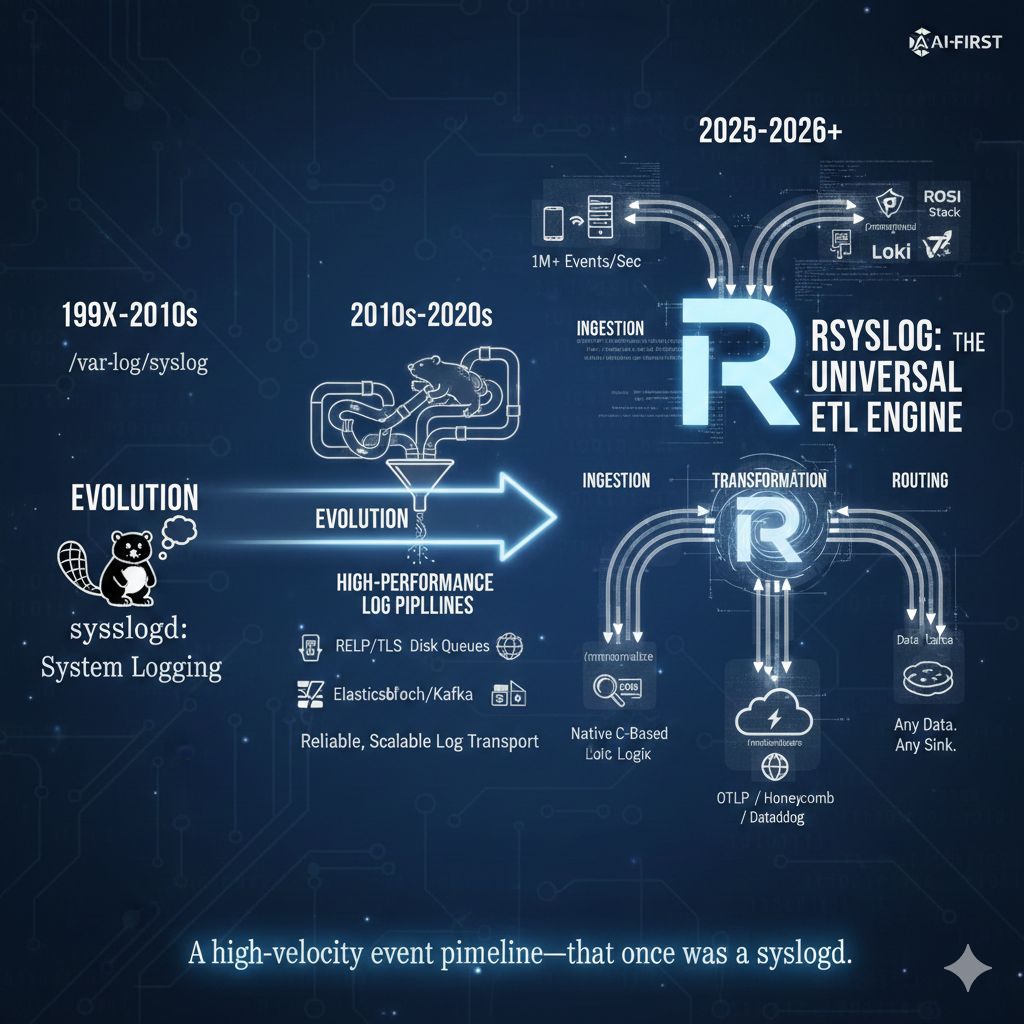
This is a small but visible change. It reflects how rsyslog is actually used today in modern infrastructures, and it aligns the project’s public description with long-standing technical reality. It is not a rebranding exercise, and it does not change what rsyslog is compatible with or where it comes from.
If you have followed the project for a long time, the wording may stand out. That is intentional. It acknowledges an evolution that has been underway for years and that many users already rely on in production.
Continue reading “What rsyslog is today: a high-performance log ingestion and ETL engine”imfile inotify handling improved: safer systems, lower rsyslog impact
Large imfile deployments can put pressure on Linux inotify resources. In practice, running out of inotify watches is very uncommon, but when it does happen, the consequences used to be unpleasant and system-wide.

To address this properly, we completed a single improvement delivered in two steps: treat inotify usage as a bounded, shared system resource while keeping rsyslog itself as unaffected as possible.
Continue reading “imfile inotify handling improved: safer systems, lower rsyslog impact”rsyslog: High-Performance Syslog Server and Log Aggregation Tool
The rocket-fast system for log processing pipelines
rsyslog helps you collect, transform, and route event data reliably at scale. Built for speed, flexibility, and control in modern Linux and container environments.

Runs great on single hosts and in containerized deployments.
Trusted by organizations worldwide
1M+
Messages per second
100+
Input/output modules
20+
Years in production
📦 Current versions
Download the latest stable release, daily builds, or explore containerized deployments. All versions include documentation and release notes.
🚪 Windows Agent: 26.11[download]
Get started in 60 seconds
Two quick ways to try rsyslog.
# Debian/Ubuntu
sudo apt-get update
sudo apt-get install -y rsyslog
sudo systemctl enable --now rsyslog
# Config lives in /etc/rsyslog.conf and /etc/rsyslog.d/
# Docker (example)
docker run --name rsyslog/rsyslog -d \
-v $(pwd)/rsyslog.conf:/etc/rsyslog.conf:ro \
-p 514:514/tcp -p 514:514/udp \
rsyslog/rsyslogSee First steps guide and Basic configuration reference for more detail.
What is rsyslog?
rsyslog is an open-source, high-performance engine for collecting, transforming and routing event data. It ingests from diverse sources (files, journals, syslog, Kafka), applies parsing, enrichment and filtering rules via RainerScript and modules like mmnormalize, buffers safely with disk-assisted queues, and forwards to Elasticsearch, Kafka, HTTP endpoints or files. With over 20 years of proven reliability, rsyslog bridges classic syslog-style logging and modern data pipelines — now guided by an AI-First (human-controlled) vision for smarter observability.
Why operators rely on rsyslog
💾 Reliable delivery
Disk-assisted queues and backpressure controls keep pipelines flowing.
📎 Flexible parsing
Support for regex, structured formats, JSON, and liblognorm pipelines.
📦 Powerful routing
Conditional rules and reusable templates with RainerScript.
📭 Broad outputs
Files, TCP/UDP/TLS syslog, Kafka, HTTP, and database destinations.
📰 Performance at scale
Multi-threaded design with tuning controls for predictable latency.
🌍 Runs anywhere
Bare metal, virtual machines, and containerized environments.
Works with your observability stack
| Target | Description / Docs link |
|---|---|
| Elastic / OpenSearch | output-elasticsearch module guide |
| Grafana Loki | HTTP/JSON shipping example |
| Kafka | omkafka documentation |
| Splunk HEC | omhttp configuration example |
| Files & rotation | omfile output reference |
| Databases | Output modules overview |
Integrates via open protocols (syslog, TCP/TLS, HTTP, Kafka). No cloud-vendor lock-in.
💼 Professional services for production workloads
Need expert help to ship faster and reduce risk? Our team provides architecture reviews, performance tuning, migrations, troubleshooting, and long-term support—tailored to your stack.
- ✅ Architecture & performance reviews
- ✅ Production readiness, HA & DR patterns
- ✅ Migrations (e.g., from Kiwi, Logstash)
- ✅ Custom modules and integrations
- ✅ Incident response and troubleshooting
- ✅ SLAs and long-term support options
💻 Two tiny examples
Example A (RainerScript)
module(load="imuxsock")
module(load="imklog")
template(name="jsonl" type="list") {
  constant(value="{\"ts\":\"")     property(name="timereported" dateFormat="rfc3339")
  constant(value="\",\"host\":\"") property(name="hostname")
  constant(value="\",\"msg\":\"")  property(name="msg" format="json")
  constant(value="\"}\n")
}
*.* action(type="omfile" file="/var/log/events.jsonl" template="jsonl")
Example B (RainerScript)
module(load="imuxsock")
module(load="omkafka")
if ($programname == "sshd") then {
  action(type="omkafka"
         broker=["kafka:9092"]
         topic="security-auth"
         template="RSYSLOG_TraditionalFileFormat")
}
🤖 Self-support with the rsyslog Assistant
The rsyslog Assistant is an AI-powered self-support tool based on curated, verified project knowledge, supervised by maintainers. Use it to explore configuration options, examples, and troubleshooting tips.
📢 Latest from the project
rsyslog Windows Agent 8.4a Version History
Release date: 2026-11-04. Build IDs: Service 8.4.0.241, Client 8.4.0.335. Bugfixes Download The versioned installer is rsyslog Windows Agent 8.4a, 88…
rsyslog Windows Agent 8.4a Released
Adiscon has released rsyslog Windows Agent 8.4a, a maintenance update for the rsyslog Windows Agent 8.4 line. This update ships…
rsyslog Windows Agent 26.11 Technical Release Notes
Release date: November 3, 2026Service build: 26.11.0.357Configuration Client build: 26.11.0.446User Interface build: 26.11.0.1020 Upgrade assessment Recommendation: Recommended update Why update…
rsyslog 8.2510.0 (2025.10) released
We have today released the 8.25100 rsyslog scheduled stable release. This release delivers three main themes: better Windows Security event ingestion, more flexible JSON handling end to end, and pragmatic compatibility fixes across popular outputs and platforms. It also includes steady documentation improvements and CI hardening.
Continue reading “rsyslog 8.2510.0 (2025.10) released”